
AI Visibility
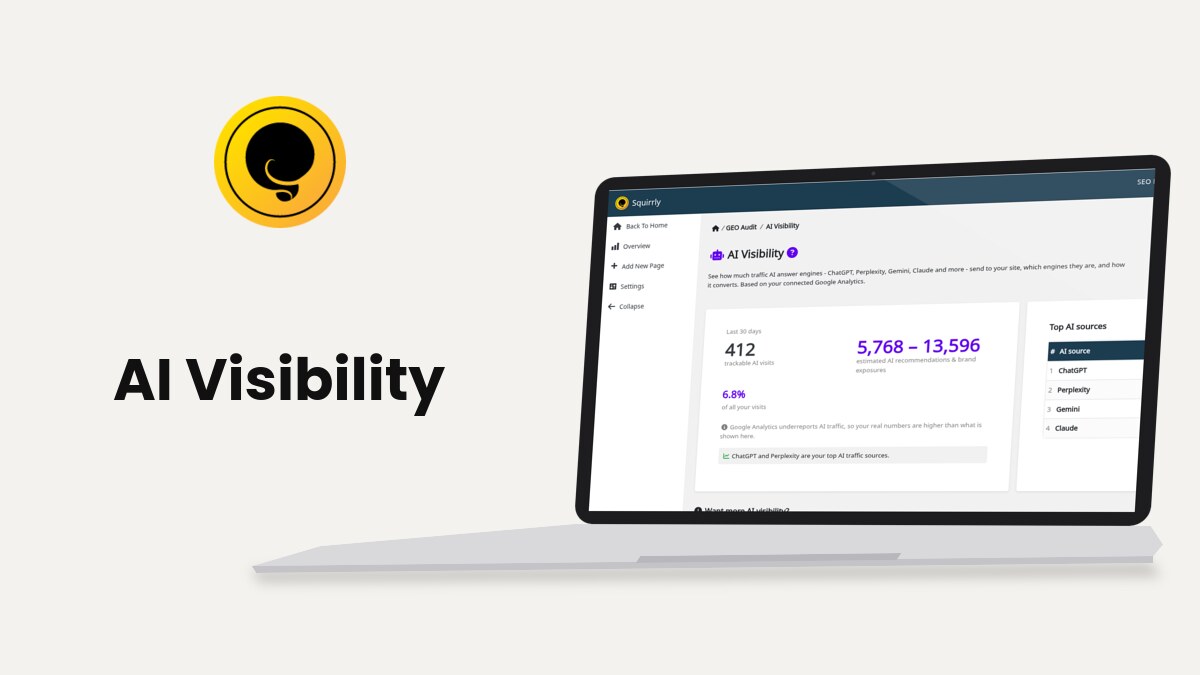
AI Visibility, at Squirrly > AI Visibility, shows how many visits AI answer engines such as ChatGPT, Perplexity, Gemini and Claude sent to your site in the last 30 days, and which engines sent them. The numbers come from your Google Analytics 4 property, read through Squirrly Cloud.
The screenshots come from demo.squirrly.co, a test store for cat food, with Squirrly SEO 14.2.8 and the Advanced Pack 2.5.11.
What AI Visibility shows
The plugin text says AI Visibility “reads the traffic that AI engines send you from your Google Analytics”. It shows those visits, their share of all your visits and the engines that sent them.
| Block on the screen | What it shows |
|---|---|
| trackable AI visits | The visits from AI engines that Google Analytics recorded in the period |
| estimated AI recommendations & brand exposures | A range worked out from the trackable visits, see How the estimate is worked out |
| of all your visits | The AI visits as a percentage of all the visits to your site |
| conversions from AI | Conversions from AI visits, shown when Squirrly Cloud returns them |
| Top AI sources | A table with each AI source and its visits, up to 15 rows |
Under the numbers, a line from Squirrly Cloud names your top sources. On the demo it reads “ChatGPT and Claude are your top AI traffic sources.”
Where to find it
AI Visibility has its own item in the left WordPress menu, Squirrly > AI Visibility. It opens inside the GEO Audit section, so the breadcrumb reads GEO Audit / AI Visibility and the left Squirrly menu keeps the GEO Audit links (Overview, Add New Page, Settings).
The same data appears in a smaller box on Squirrly > GEO Audit > Overview, between the Scores and Audit History, when there is AI traffic to show.
Connect Google Analytics first
AI Visibility reads only Google Analytics. Without the connection, the screen shows “Connect Google Analytics to unlock AI Visibility” and a Connect Google Analytics button.
- Go to Squirrly > Technical SEO > Connect Tools, or click Connect Google Analytics on the AI Visibility screen.
- Click Sign in next to Google Analytics and log in with the Google account that owns the property.
- Pick the GA4 property of your site.
- Check that the field reads “You are connected to Google Analytics”, then open Squirrly > AI Visibility again.
The Connect Google Analytics task in the Audit Mastery Tasks, on the GEO Audit screens, turns green once the connection works.
The whole Connect Tools page needs the plugin connected to Squirrly Cloud. Connect Tools covers the other options on that page, and How do I connect Google Analytics explains the difference between the tracking code and the API connection.
Read the AI Visibility report
- Go to Squirrly > AI Visibility.
- Read the left card, labeled Last 30 days, for the totals.
- Read the right card, Top AI sources, for the visits by engine.
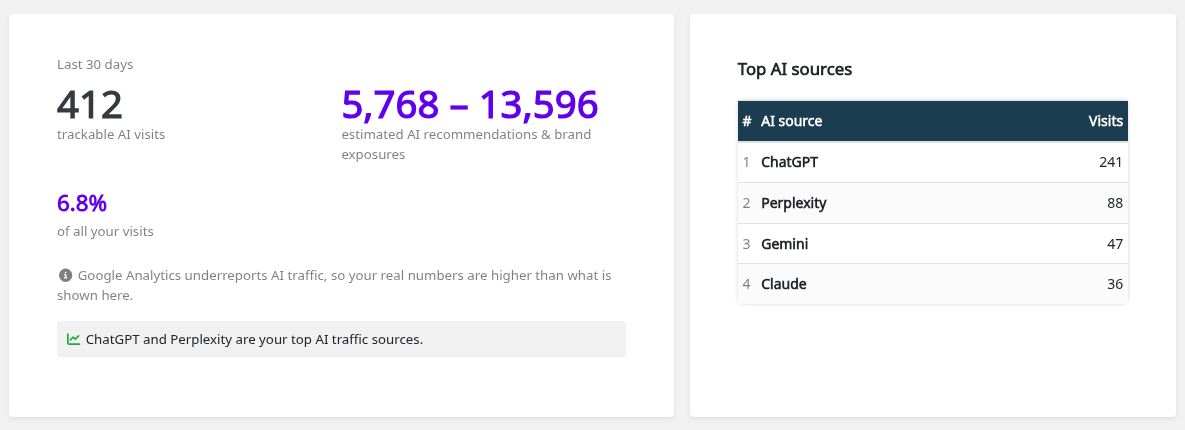
The demo store is a new site, so the report screenshots use example numbers: 412 trackable AI visits, 6.8% of all visits. ChatGPT sent 241 of them, Perplexity 88, Gemini 47 and Claude 36.
Those 12 visits are 0.1% of all the visits in the period. The conversions block doesn’t appear on the demo, because Squirrly Cloud returned no conversion number for it.
How the estimate is worked out
The purple range is the trackable AI visits multiplied by 14 and by 33. The plugin code explains the two numbers as the AI recommendations and brand exposures that Google Analytics can’t track, about 14 to 33 for each tracked visit.
In the example, 412 visits give 412 x 14 = 5,768 and 412 x 33 = 13,596, so the screen shows 5,768 to 13,596. The range only appears when there is at least one trackable visit.
The screen also says “Google Analytics underreports AI traffic, so your real numbers are higher than what is shown here.”
Top AI sources
The table lists the AI sources in order of visits, with the rank number, the source name and the visits. It shows up to 15 sources. When Squirrly Cloud returns no source list for the period, the card reads “No individual AI sources for this period yet.”
The AI Visibility box on the GEO Audit
The GEO Audit Overview repeats the same numbers in one box: trackable AI visits, the estimated range, the percentage of all visits and the top sources table.

The box stays hidden when Google Analytics isn’t connected or has no AI traffic. The full screen at Squirrly > AI Visibility shows a message in both cases.
Visits from AI answers, not an AI rank
AI Visibility counts visits that already happened. It reads them from your own Google Analytics 4 property, so each one is a person who clicked from an AI answer to your site. It doesn’t run sample prompts or guess where your brand sits inside an AI answer.
Those positions move too much to track. Rand Fishkin of SparkToro and Patrick O’Donnell of Gumshoe ran 2,961 prompts through ChatGPT, Claude and Google’s AI answers with hundreds of volunteers, in a study reported in January 2026. For ChatGPT and Google, the chance of getting the same list of brands twice was under 1 in 100.
The same list in the same order came up less than 0.1% of the time. Fishkin’s conclusion: “any tool that gives a ‘ranking position in AI’ is full of baloney.” The study found that how often a brand is mentioned across many runs is steadier than its position. SparkToro’s report has the full method.
Get more AI visits
Under the report, Want more AI visibility? lists three actions. Each one has its own screen in Squirrly SEO.

| Tip on the screen | Where you do it |
|---|---|
| Keep your GEO/AEO Audit green | Squirrly > GEO Audit, the AEO/GEO section of the report |
| Allow AI crawlers and publish an llms.txt | Squirrly > Technical SEO > Tweaks & Sitemaps, the Robots File and LLMs File tabs |
| Use LLM Indexing to push new and updated pages | Squirrly > LLM Indexing, see Auto-Indexing |
The GEO Audit report puts its AEO/GEO section first. Its tasks include Allowed for AI crawlers?, llms.txt file present? and Answer-ready structured data?, and each failed task lists the pages to fix.
The other AEO/GEO tasks check the page itself: Opens with a direct answer?, Uses question-style headings?, Has extractable lists or tables?, Enough depth to be useful? and Is the content fresh?. A failed task lists its pages, for example under “Pages that don’t lead with a direct answer”.
For a page you want AI engines to quote, start with the Live Assistant and add answer-ready JSON-LD, such as FAQPage or HowTo.
Troubleshooting
“Connect Google Analytics to unlock AI Visibility”
Squirrly has no Google Analytics connection for this site. Connect the GA4 property from Squirrly > Technical SEO > Connect Tools, as in Connect Google Analytics first.
“No AI-engine traffic detected yet”
Google Analytics is connected but recorded no visits from AI engines in the last 30 days. The screen offers Open GEO Audit, where the AEO/GEO tasks show what to fix first.
The numbers look lower than the AI mentions I see
AI Visibility counts only the visits Google Analytics records. The screen notes that Google Analytics underreports AI traffic, and the estimated range stands for the recommendations and brand exposures without a tracked visit.
Frequently asked questions
Which AI engines does AI Visibility count?
The screen names ChatGPT, Perplexity, Gemini and Claude “and more”, and the Top AI sources table lists each engine found in your Google Analytics data.
What period does the report cover?
The last 30 days, as the Last 30 days label on the left card says.
Does AI Visibility need the Advanced Pack?
It works without the Advanced Pack, on a Squirrly Cloud connection and Google Analytics 4.
Is the estimated range a real count?
No, it’s the trackable visits multiplied by 14 and by 33.
Related tutorials
- GEO Audit: the AEO/GEO tasks for AI crawlers, llms.txt and answer-ready pages.
- Connect Tools: connect Google Analytics and Google Search Console.
- Robots.txt File Settings: allow GPTBot, ClaudeBot and the other AI crawlers.
- LLMs.txt File Settings: publish an llms.txt file for AI engines.
- Auto-Indexing: send new and updated pages for indexing.







0 Comments