Check METAs with & without Squirrly SEO

Add ?sq_seo=off to the address of any page of your site to load it without Squirrly SEO’s metas. Compare its source with the normal page to see exactly which tags Squirrly writes and which ones come from your theme or another plugin.
How to compare the two versions
- Open the page on your site, for example
https://demo.squirrly.co/how-many-times-a-day-should-a-cat-eat/. - Press Ctrl+U (Cmd+Option+U on a Mac) to view the source, and search for
<title. - In a new tab, open the same address with the parameter:
https://demo.squirrly.co/how-many-times-a-day-should-a-cat-eat/?sq_seo=off. If the address already has a?, add&sq_seo=offinstead. - View the source of the second tab and compare the head of the two pages.
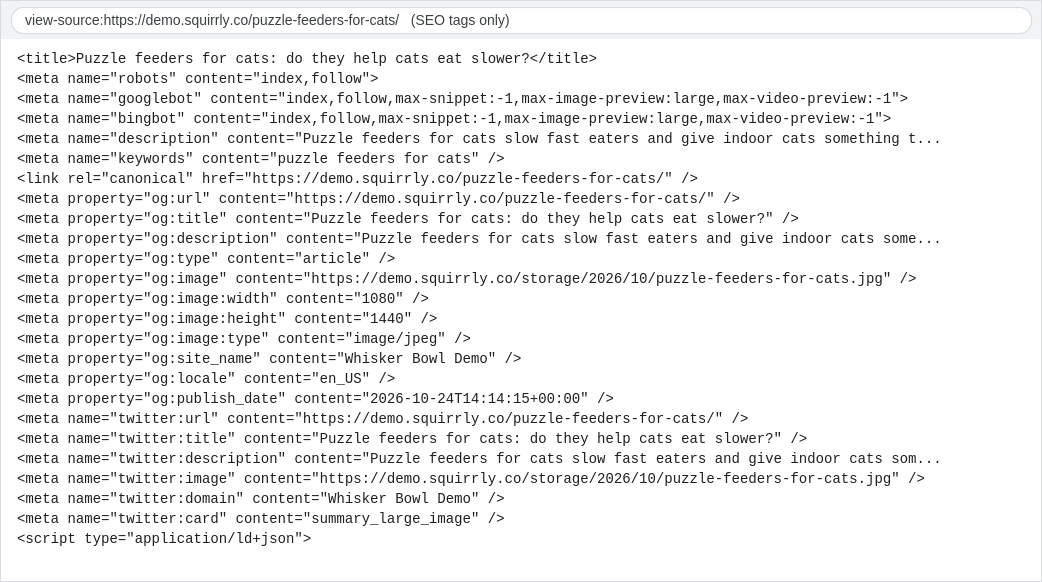
On the demo post, the normal page has the title, robots, googlebot, bingbot, description, keywords and canonical metas from Squirrly, then its Open Graph, Twitter Card and JSON-LD. With ?sq_seo=off, the same post keeps only the WordPress title with the site name after it, the WordPress canonical link and one JSON-LD block that another plugin adds. The description, keywords, robots and Open Graph lines are gone, because Squirrly wrote them.
Example on the demo store
The same demo post, loaded twice. With ?sq_seo=off, the head keeps only what WordPress writes by itself: a title and a canonical link.

Without the parameter, Squirrly adds the robots metas, description, keywords, Open Graph, Twitter Card and JSON-LD, and rewrites the title:
What the parameter turns off
With sq_seo=off, Squirrly skips its whole page buffer for that one request. That covers:
- the title, description, keywords, canonical, Dublin Core and robots metas from SEO Metas
- the Open Graph and Twitter Card metas from Social Media
- the JSON-LD from Rich Snippets
- the nofollow and new-tab changes of SEO Links
It changes nothing in your settings or posts. Remove the parameter and the page loads with Squirrly again.
What the comparison tells you
| You see | What it means |
|---|---|
| Both versions are the same | Squirrly isn’t loading on that page, or the cache serves the same copy. Clear the page cache and check that Load SEO Metas is on for the post type in Automation |
| A tag only in the normal page | Squirrly writes it |
A tag only in the sq_seo=off version | Squirrly removed it and wrote its own, which is how it avoids duplicate metas |
| The same tag in both versions | WordPress, the theme or another plugin writes it, and the matching Squirrly option is off or has no value for that page |
To change what Squirrly writes for one page, open its snippet in Bulk SEO.
Frequently asked questions
Can visitors use sq_seo=off too?
Yes, the parameter works for any request to the page, and it only affects that one request.
Is there an sq_seo=on parameter?
No, the code in 14.2.11 only reads sq_seo=off, and a normal page load already runs Squirrly.
Does the parameter change my SEO settings?
No, nothing is saved, and the next normal page load uses your settings again.
Related tutorials
- SEO Metas: the meta tags Squirrly writes.
- Add Custom META Title: change the title Squirrly writes.
- Add Custom Canonical Link: point a page to its original.
- Advanced Settings: minify the metas or load them later in the page.