
Testing the Squirrly Abilities

You can test the 16 Squirrly SEO abilities layer by layer with WP-CLI, the WordPress REST API and the MCP Adapter, before or after you connect an assistant from Squirrly > Technical SEO > Connect Tools > AI Tools. Each step below checks one layer, so a failure points to one cause.
The outputs shown were taken on demo.squirrly.co (WordPress 7.1.4, Squirrly SEO 14.2.9, Advanced Pack 2.5.11) on November 2, 2026. Post 194 on the demo is “What to feed a senior cat”; use one of your own post IDs.
What you are testing
| Step | Layer | Needs |
|---|---|---|
| 1 | Squirrly registers its abilities and marks them visible to MCP | WP-CLI |
| 2 | The abilities run, and low roles are refused | WP-CLI |
| 3 and 4 | The REST API answers with an Application Password | HTTPS, curl |
| 5 and 6 | The MCP Adapter serves the abilities over STDIO | The AI Tools switch on |
| 7 | MCP over HTTP, with a session | curl |
| 8 | An assistant reads and writes real SEO data | Claude, ChatGPT, Codex or a local client |
If you only want to script Squirrly, you can stop after step 4. WordPress core has no wp ability command, so the first steps use wp eval and the later ones the adapter’s wp mcp-adapter command.
Before you start
| Requirement | How to check |
|---|---|
| WordPress 6.9 or newer, for the Abilities API | wp core version |
| PHP 7.4 or newer, for the MCP Adapter | wp --info |
| HTTPS, for Application Passwords | The site address under Settings > General starts with https:// |
| A test post you can change | Any post ID; the examples use 42 |
1. Confirm the abilities are registered and visible
An MCP client lists an ability only when its metadata has the nested flag mcp.public. An ability without it still works over REST and WP-CLI, so check the flag too.
wp eval '
$sq = array_filter( wp_get_abilities(), function ( $a ) {
    return strpos( $a->get_name(), "squirrly/" ) === 0;
} );
foreach ( $sq as $a ) {
    $m = $a->get_meta();
    printf( "%-40s %s\n", $a->get_name(),
        ( $m["mcp"]["public"] ?? false ) ? "visible" : "HIDDEN" );
}
echo "total: " . count( $sq ) . "\n";
'
On the demo site this printed:
squirrly/get-seo                         visible
squirrly/update-seo                      visible
squirrly/get-patterns                    visible
squirrly/get-settings                    visible
squirrly/update-settings                 visible
squirrly/get-briefcase                   visible
squirrly/get-ranks                       visible
squirrly/get-focus-pages                 visible
squirrly/get-keyword-research-history    visible
squirrly/get-live-assistant-tasks        visible
squirrly/add-briefcase-keyword           visible
squirrly/assign-keyword                  visible
squirrly/add-focus-page                  visible
squirrly/recheck-focus-page              visible
squirrly/add-audit-page                  visible
squirrly/request-audit                   visible
total: 16
total: 0 means WordPress is older than 6.9. A HIDDEN line means an old copy of Squirrly SEO, so update it before you go on.
2. Run one ability, then check the permission gate
wp eval '
$admin = get_users( array( "role" => "administrator", "number" => 1 ) );
wp_set_current_user( $admin[0]->ID );
$r = wp_get_ability( "squirrly/get-seo" )->execute( array( "post_id" => 42 ) );
echo is_wp_error( $r ) ? "ERROR: " . $r->get_error_code() . "\n"
                       : wp_json_encode( $r["seo"] ) . "\n";
'
You get a JSON object with the stored SEO fields of the post. Next, check that a subscriber is refused, then delete the test user:
UID=$(wp user create abilitytest abilitytest@example.invalid --role=subscriber --porcelain)

wp eval "
wp_set_current_user( $UID );
\$r = wp_get_ability( 'squirrly/update-seo' )->execute(
    array( 'post_id' => 42, 'seo' => array( 'title' => 'nope' ) )
);
echo is_wp_error( \$r ) ? 'DENIED: ' . \$r->get_error_code() . \"\n\" : \"ALLOWED\n\";
"

wp user delete $UID --yes
The expected line is DENIED: ability_invalid_permissions. A Contributor is worth one more run: it can change the SEO of its own draft and is refused once that post is published.
3. Create an Application Password
wp user application-password create admin dev-testing --porcelainCopy the value with its spaces, because WordPress prints it only this once. The same thing is in Users > Profile > Application Passwords, with Add Application Password.
WordPress hides Application Passwords on sites without HTTPS. For a local http:// test site only, you can add this line in wp-content/mu-plugins/dev-apppass.php and delete the file afterwards:
<?php add_filter( 'wp_is_application_passwords_available', '__return_true' );Never leave that filter on a public site, since the password then travels in clear text.
4. Test over the REST API
AUTH='admin:xxxx xxxx xxxx xxxx xxxx xxxx'
SITE='https://yoursite.com'

# list the Squirrly abilities
curl -s -u "$AUTH" "$SITE/wp-json/wp-abilities/v1/abilities" | grep -o '"squirrly/[a-z-]*"'

# read: GET, input in the query string (quote the URL)
curl -s -u "$AUTH" "$SITE/wp-json/wp-abilities/v1/abilities/squirrly/get-seo/run?input%5Bpost_id%5D=42"

# write: POST, fields inside "input"
curl -s -u "$AUTH" -X POST -H 'Content-Type: application/json' \
  -d '{"input":{"post_id":42,"seo":{"title":"REST test title"}}}' \
  "$SITE/wp-json/wp-abilities/v1/abilities/squirrly/update-seo/run"
A successful write returns "saved":true. Then check the page itself:
curl -s "$SITE/your-post-slug/" | grep -o '<title>[^<]*</title>'You should see REST test title. Send "title":"" the same way to clear it when you finish.
5. Turn on the MCP connection
Squirrly SEO includes the MCP Adapter, so there is no plugin to install.
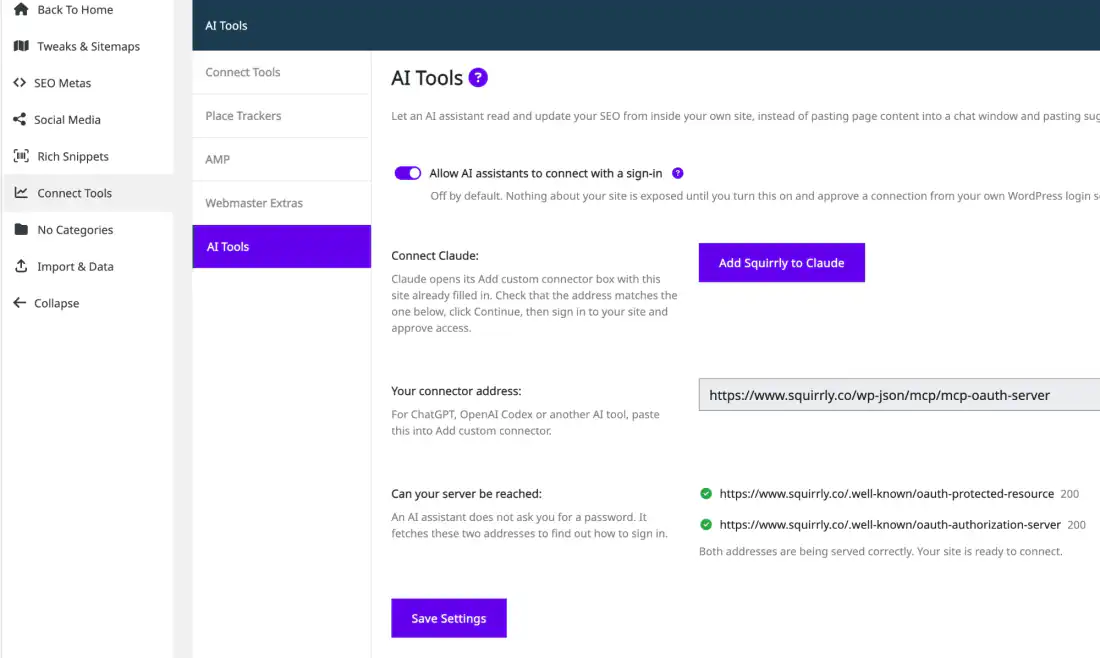
- Go to Squirrly > Technical SEO > Connect Tools and open AI Tools.
- Turn on Allow AI assistants to connect with a sign-in and click Save Settings.
- Run
wp mcp-adapter list.
The demo site returned two servers:
ID                          Name                        Version  Tools  Resources  Prompts
mcp-oauth-server            MCP OAuth Server            v1.0.0   16     0          0
mcp-adapter-default-server  MCP Adapter Default Server  v1.0.0   3      0          0
The OAuth server lists the 16 Squirrly tools by name, for web assistants that sign in. The default server lists 3 generic tools, mcp-adapter-discover-abilities, mcp-adapter-get-ability-info and mcp-adapter-execute-ability, which reach the same abilities.
6. Test MCP over STDIO
STDIO runs the server inside WP-CLI, with no network and no sign-in in the way.
echo '{"jsonrpc":"2.0","id":1,"method":"tools/call","params":{
  "name":"mcp-adapter-discover-abilities","arguments":{}}}' \
| wp mcp-adapter serve --user=admin --server=mcp-adapter-default-server
The answer lists every visible ability, and on the demo it named all 16 squirrly/ entries. Then run one:
echo '{"jsonrpc":"2.0","id":2,"method":"tools/call","params":{
  "name":"mcp-adapter-execute-ability",
  "arguments":{"ability_name":"squirrly/get-seo","parameters":{"post_id":42}}}}' \
| wp mcp-adapter serve --user=admin --server=mcp-adapter-default-server
Look for "success":true and a data object with target, url, seo and computed. For post 194 the demo returned the title “What to feed a senior cat: a practical guide” and the hash a597e50502f5ff68e3e25b9114205d4a, which is the MD5 of 194.
The arguments are ability_name and parameters. With name and input the demo answered Permission denied: Ability name is required.
7. Test MCP over HTTP
Every request after initialize must carry the session ID that initialize sends back in the Mcp-Session-Id header.
SERVER="$SITE/wp-json/mcp/mcp-adapter-default-server"

SID=$(curl -s -D - -o /dev/null -u "$AUTH" -X POST "$SERVER" \
  -H 'Content-Type: application/json' \
  -H 'Accept: application/json, text/event-stream' \
  -d '{"jsonrpc":"2.0","id":1,"method":"initialize","params":{
       "protocolVersion":"2025-11-25","capabilities":{},
       "clientInfo":{"name":"curl","version":"1"}}}' \
  | grep -i '^mcp-session-id:' | tr -d '\r' | awk '{print $2}')

curl -s -u "$AUTH" -X POST "$SERVER" \
  -H 'Content-Type: application/json' \
  -H 'Accept: application/json, text/event-stream' \
  -H "Mcp-Session-Id: $SID" \
  -d '{"jsonrpc":"2.0","id":2,"method":"tools/call","params":{
       "name":"mcp-adapter-discover-abilities","arguments":{}}}' \
  | grep -o '"squirrly/[a-z-]*"' | sort -u
The second call should list the 16 squirrly/ names from step 1.
8. Connect an assistant
Web assistants (Claude, ChatGPT, Codex) use /wp-json/mcp/mcp-oauth-server and the approval page on your site, as described in Connect Squirrly to AI Assistants. Local clients such as Claude Desktop use the default server with the Application Password from step 3, through @automattic/mcp-wordpress-remote; the configuration is in How to Connect MCP Plugins to Squirrly SEO.
Check a real round trip
- Ask “List the Squirrly tools you have.” A sign-in connection names 16, such as Read page SEO and Add Focus Page.
- Ask “What is the SEO title and meta description of post 42?” and compare with step 4.
- Ask “Which Automation pattern produces that title?” It should name the pattern from Automation.
- Ask “Change the SEO title of post 42 to round trip test.”
- Open the post’s Squirrly SEO snippet in WordPress and the page source, and check both show the new title.
Set the title back, then remove the test password with wp user application-password delete admin --all.
Testing safely on a live site
Squirrly keeps per-page SEO in its own table, {prefix}qss, not in post meta, so a post revision won’t undo an ability write. Download a backup from Import and Data, or save the row first, using the hash that get-seo returned in target:
wp db query "SELECT seo FROM $(wp db prefix)qss WHERE url_hash = 'a597e50502f5ff68e3e25b9114205d4a'"| Behaviour | What it means for a test |
|---|---|
| update-seo is a partial update | Fields you leave out keep their stored value |
jsonld_types is a full list | A schema type you leave out loses its stored data |
get-seo returns seo and computed | Writing a computed value back fixes that page to it and detaches it from its pattern |
A post type without its own pattern uses the shared custom one | computed.source.shared_pattern_warning says so, and editing that pattern changes every type in the same position |
| Cloud reads are cached 5 minutes | A write through Squirrly clears the cache; changes made elsewhere show a few minutes later |
Connect a dedicated user with the lowest role that does the job. A Squirrly SEO Editor can change the SEO of every page but not the site-wide settings.
Troubleshooting
| Message | Cause and fix |
|---|---|
total: 0 in step 1 | WordPress is older than 6.9 and has no Abilities API |
HIDDEN in step 1 | An old Squirrly SEO version; update it |
| Read-only abilities require GET method. | You sent POST to a read ability; use GET with input[...] |
| input is not of type object. | The POST body has the fields at the top level; wrap them in input |
| Missing Mcp-Session-Id header | A request after initialize went without the session ID (step 7) |
| Ability name is required | Use ability_name and parameters with mcp-adapter-execute-ability |
| Unknown OAuth client. | The assistant is not a trusted publisher; add it with sq_mcp_trusted_publishers |
| This site is not connected to Squirrly Cloud, so this data is not available. | Connect the site to Squirrly Cloud; page SEO, settings and patterns work without it |
401 on every REST or MCP call
Check three things: the site runs on HTTPS, the server passes the Authorization header to PHP (Apache with CGI or FastCGI often drops it), and no security plugin blocks REST requests.
404 on reads while writes work
A security plugin blocks query strings on the REST API, which hits every GET with input[...]. Allow the wp-abilities/v1 namespace; MCP calls aren’t affected.
Frequently asked questions
Do I need the AI Tools switch for the REST tests?
No, steps 1 to 4 use the Abilities API that WordPress 6.9 and newer provides on its own.
Why does the default server show only 3 tools?
It publishes the generic discover, info and execute tools, and those reach all 16 Squirrly abilities.
Can I undo an ability write with a post revision?
No, the SEO lives in the qss table, so save the row before you test.
Related tutorials
- Connect Squirrly to AI Assistants: the sign-in for Claude, ChatGPT and Codex.
- How to Connect MCP Plugins to Squirrly SEO: the tool list, the roles and local clients.
- Automation: the patterns that get-seo names in
computed.source. - Bulk SEO & Snippet: check the stored SEO of a page in the admin.
- Import and Data: back up the Squirrly SEO before you test writes.







0 Comments