
Account, plans and billing in Squirrly Cloud
Your Squirrly Cloud account is managed from the Account dropdown in the top bar at cloud.squirrly.co. It opens Account Info, User Profile, Pricing & Plans and Billing, and the same four are tabs on the left of each screen. One account is one login.
The screenshots come from a test account, so limits and plan names on your screen will differ.
Account Info
Go to Account > Account Info. The intro reads “All details related to your account subscription: what’s included in your plan and what you still have left for the current month.”
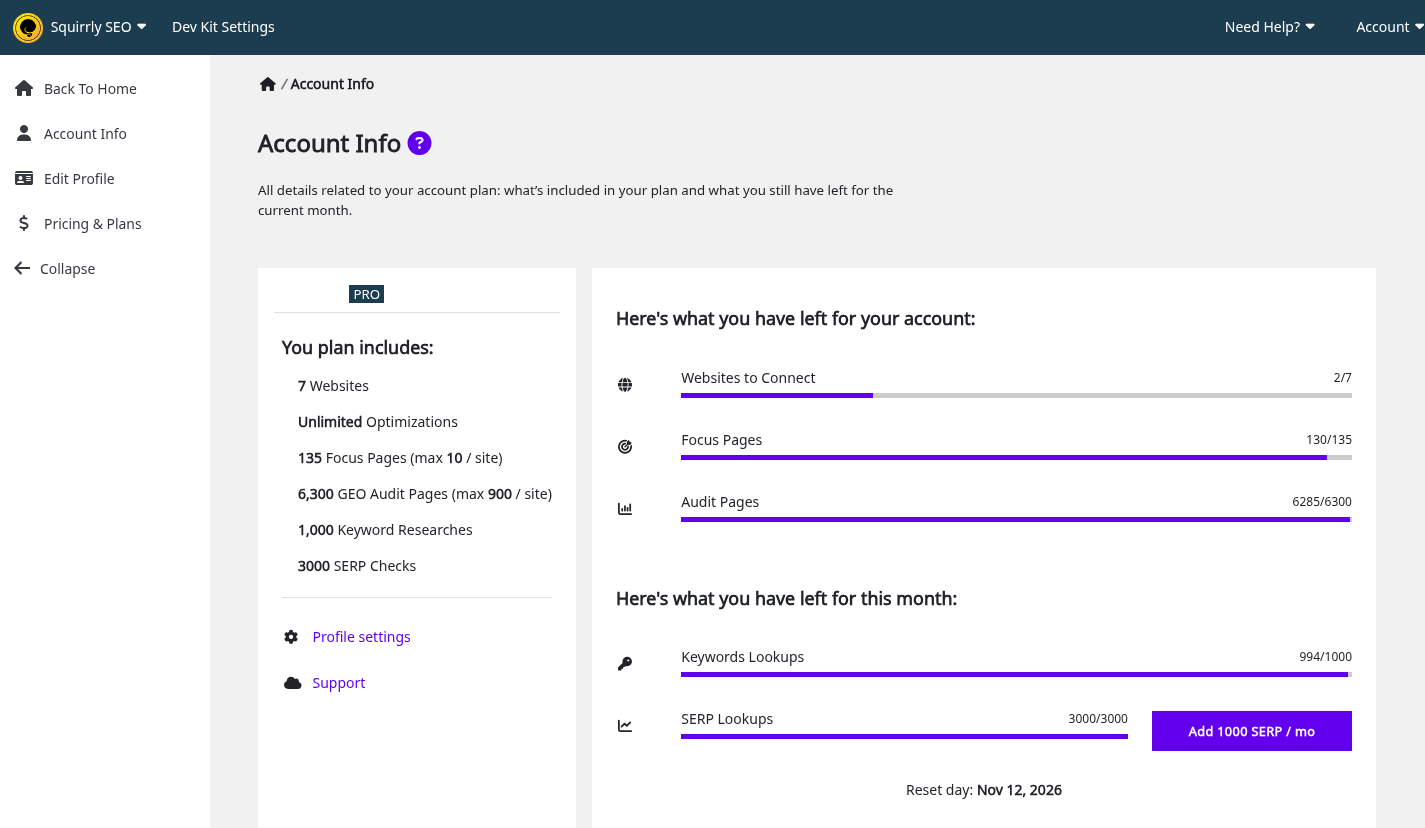
| On the left card | What it shows |
|---|---|
| Email and plan badge | The account email address and the plan name |
| Due Date: or Expires: never | The next due date, in red when it’s past. Expires: never means no end date |
| DevKit Enabled | The account has an active Dev Kit plan |
| You plan includes: | Websites, optimizations, Focus Pages, GEO Audit Pages, Keyword Researches and SERP Checks in your plan. The typo is on the screen |
| Links | Upgrade your account, Billing info, Profile settings, Support |
| On the right card | What it counts |
|---|---|
| Websites to Connect | Websites left, with disconnected ones counted as used |
| Focus Pages | Focus Pages left on the account |
| Audit Pages | GEO Audit pages left |
| Keywords Lookups | Keyword researches left this month |
| SERP Lookups | Ranking checks left this month |
| Reset day: | The next date the monthly counters go back up |
The block Trying to improve account limits via special access codes? links to the FAQ about codes with Read More for Codes.
Add more credits
| Button on Account Info | When it shows | What it adds |
|---|---|---|
| Upgrade Plan | A counter is at zero | Opens the plans |
| Buy More Credits, keywords | Keywords Lookups at zero | 20 Keyword Researches, one time |
| Buy More Credits, SERP | SERP Lookups at zero | 1000 SERP Credits, one time |
| Add 300 KR / mo | No such add-on is active | 300 Keyword Researches a month |
| Add 1000 SERP / mo | No such add-on is active | 1000 SERP Credits a month |
How the monthly reset works
Reset day is the last reset plus 30 days. At the reset, Keywords Lookups and SERP Lookups go back up to the plan value. A balance higher than the plan value stays as it is.
User Profile
Go to Account > User Profile. The card is called Edit Profile, and that’s also the name of the tab on the left.
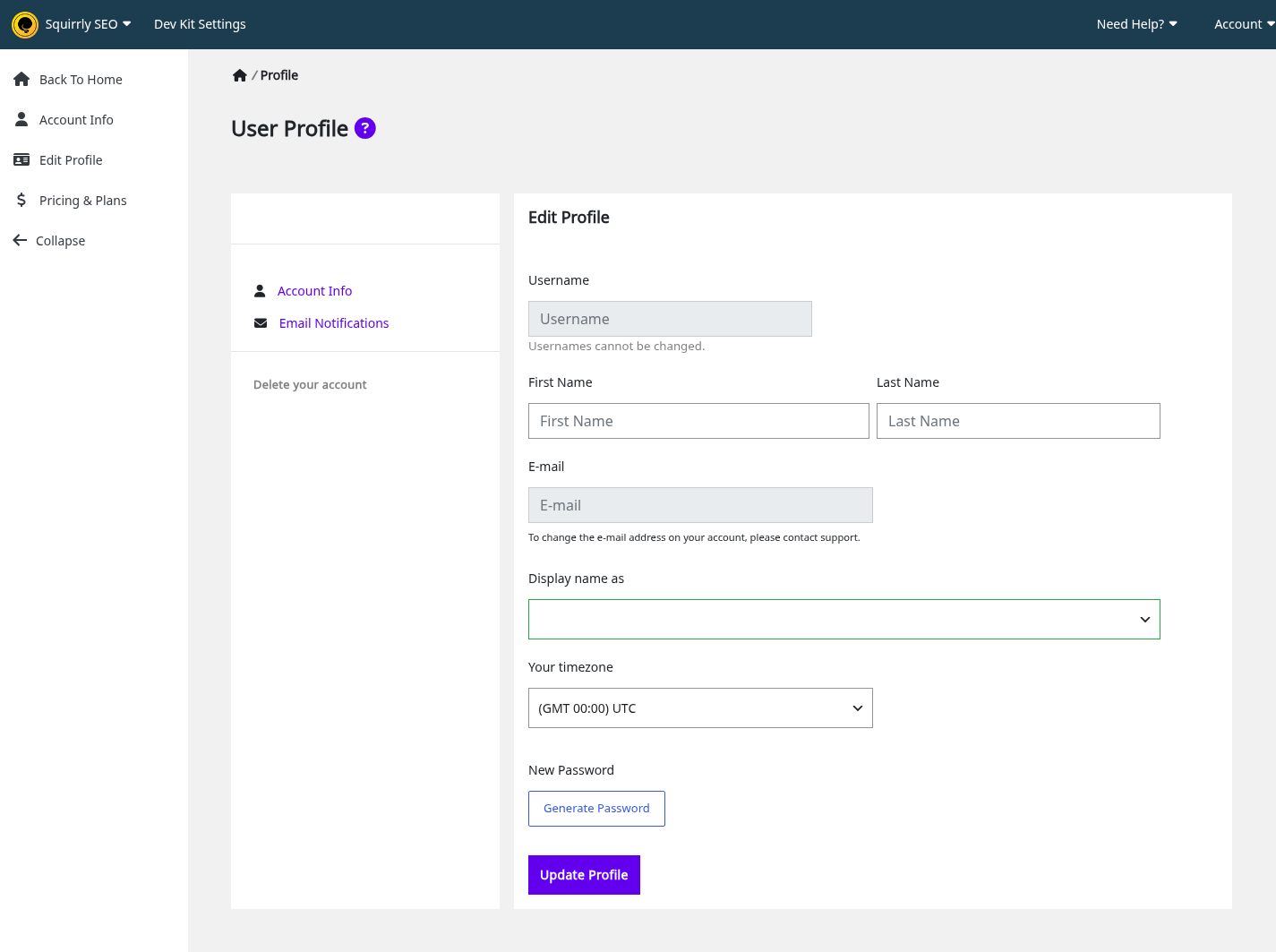
| Field | Can you change it? |
|---|---|
| Username | No. “Usernames cannot be changed.” |
| First Name, Last Name | Yes |
| No. “To change the e-mail address on your account, please contact support.” | |
| Display name as | Yes |
| Your timezone | Yes |
| New Password | Yes. Generate Password fills it in |
Click Update Profile and you see “Saved!”. The links on the left go to Account Info, Email Notifications, Billing and Delete your account.
Email Notifications
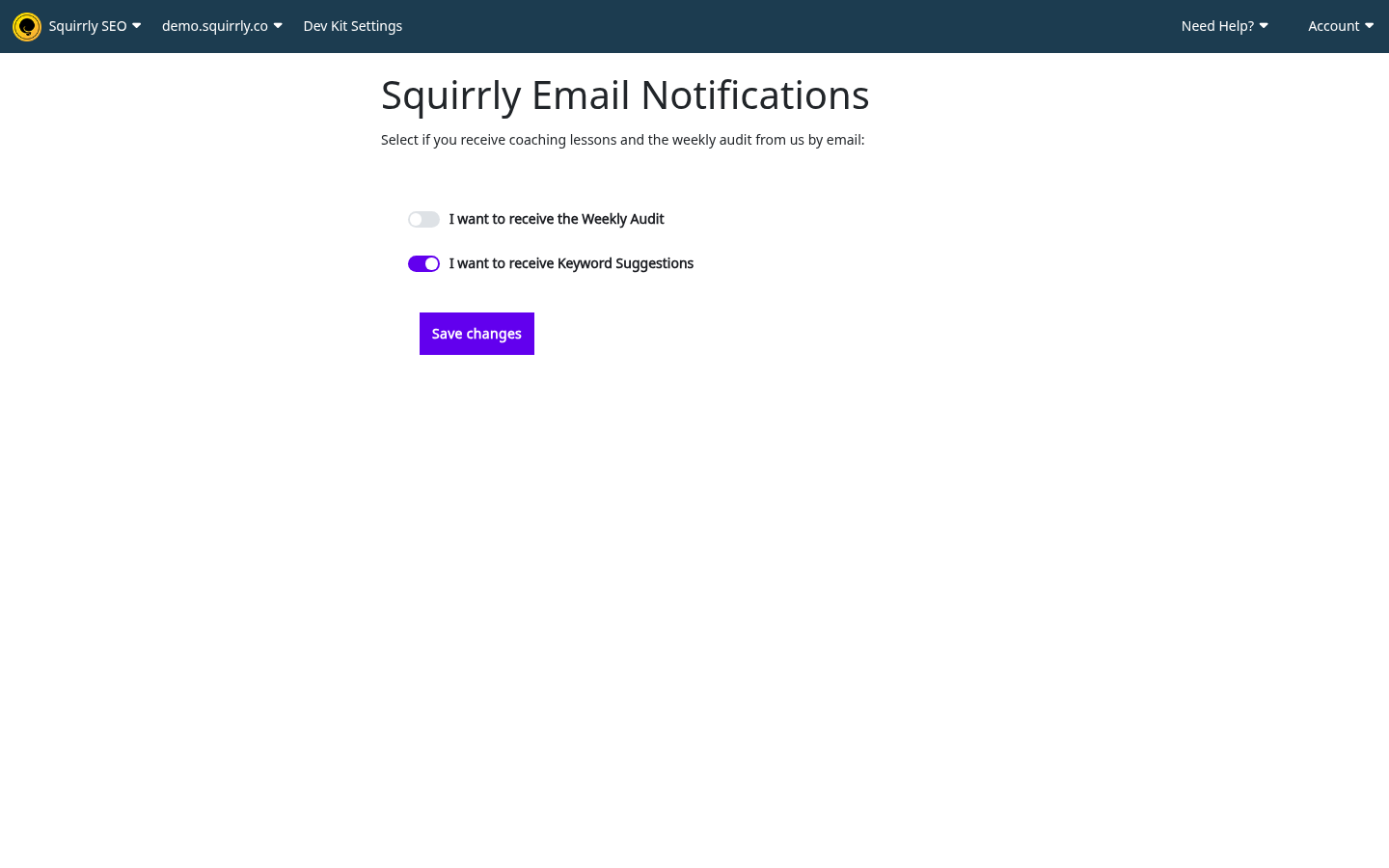
Click Email Notifications on the left of User Profile. The screen Squirrly Email Notifications says “Select if you receive coaching lessons and the weekly audit from us by email:”. It has two switches, I want to receive the Weekly Audit and I want to receive Keyword Suggestions. Click Save changes after you change one.
Delete your account
Deleting the account doesn’t cancel a paid subscription. Cancel it in Billing first, or the payments continue.
- Go to Account > User Profile.
- Click Delete your account.
- Type your password in Enter your password to confirm.
- Click Delete.
A wrong password shows “The password is not correct.” After the delete, the login page shows “Your account was deleted. Use another email address.”
Pricing & Plans
Go to Account > Pricing & Plans. The screen opens with “Simple Pricing. No long-term contracts.” and “No credit card required, unless you decide to buy. Our Plans are risk-free. Cancel anytime (no additional fees), Upgrade Plan, Downgrade Plan as you see fit.” The button under each plan reads You already have this plan, Upgrade Now, or Download Now for a free one.
Prices are on the screen and on the official pricing page, which the link at the bottom opens. PRO shows “(purchased annually)”. A coupon shows the old price struck next to the new one.
What each plan includes
The current limits of each plan are on this screen and on the official pricing page. Account Info shows what your own account includes.
Google Rankings needs the Business plan or the Web Dev Kit plans. Accounts with a Dev Kit plan are offered DK Agency 10, DK Agency 30 and DK Agency 50 on this screen instead. See Web Dev Kit in Squirrly Cloud. Older plans keep their own limits.
Subscriptions stack, so limits add up when several are active. What is License Stacking? explains it.
Add-ons
Extra Keyword Researches and SERP Credits are sold as add-ons, billed every 30 days or one time.
When a plan ends
No notice appears. The account falls back to the Free limits, and websites over the limit turn into Limit Exceeded rows in Connected Websites. The Due Date: on Account Info shows in red when it’s past. Renew the plan to get the limits back.
Billing
Go to Account > Billing. The heading is All Subscriptions, with the note “You can see your order history for all Squirrly SEO subscriptions, update your payment information and cancel current subscriptions.” The link check out the official Customer App from Squirrly opens customer.digitalpackglobal.com.
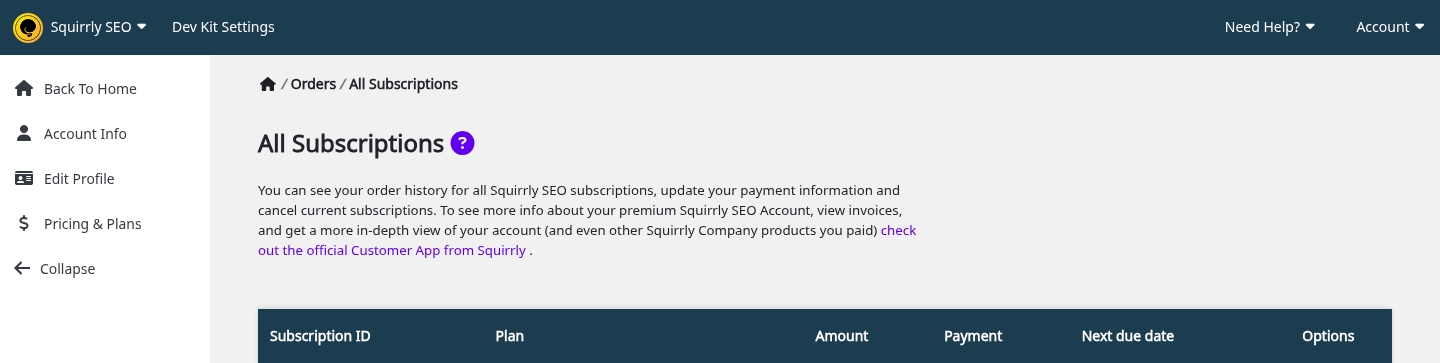
| Column | What you see |
|---|---|
| Subscription ID | Click it to open Payment History |
| Plan, Amount | The plan and its price |
| Payment | “not active” (past due by a day), “confirmed”, “processed”, “unknown”, or “active” (no end date) |
| Next due date | A date, or “never” |
| Options | “Update Payment / Cancel” or “Manage” and “Cancel”, depending on the payment provider. A canceled plan shows “canceled” on a grey row |
Only subscriptions paid through FastSpring or Paddle are listed, so free and AppSumo plans aren’t here. An empty screen shows “You have no subscriptions yet.”
Payment History and invoices
- Click the number in Subscription ID.
- Click View invoice on the order you need. The invoice opens at the payment provider.
- Use < Back to Subscriptions to go back.
The screen says “View your invoice for every order in this section. Click on View Invoice to see each individual invoice.” With no orders you see “You have no orders yet.”
Cancel a subscription or update the payment method
Canceling happens at the payment provider. The Cloud has no cancel button of its own, so the links in Options take you there.
- Go to Account > Billing.
- In Options, click Update Payment / Cancel, or Manage or Cancel.
- Finish on the provider’s page.
- Reload Billing. The row shows “canceled”. Paddle changes sync every 10 minutes.
The Options links show only on active recurring paid plans. If you don’t see them on a paid plan, use the Customer App link at the top of the screen or contact support.
Settings > Backup & Restore
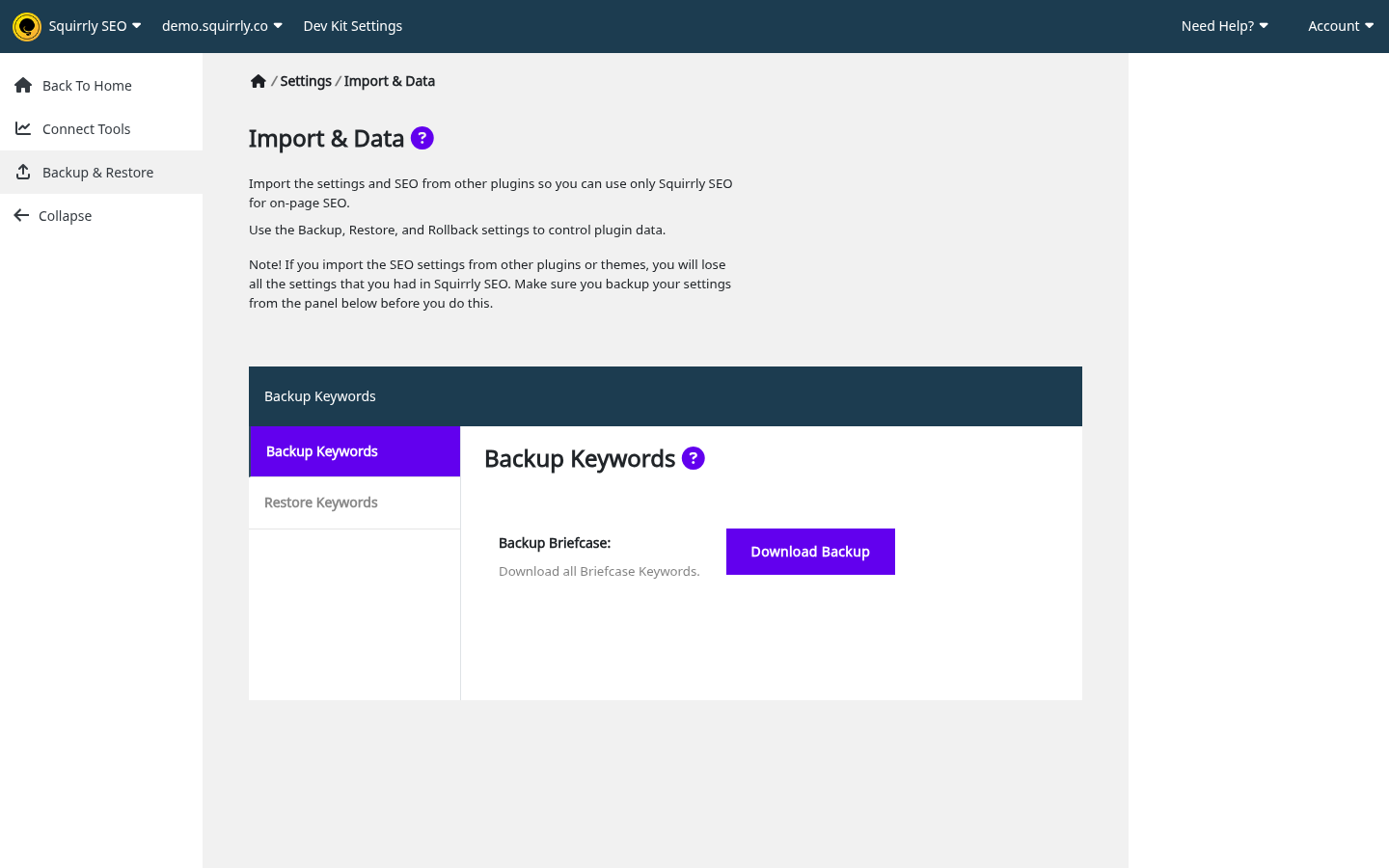
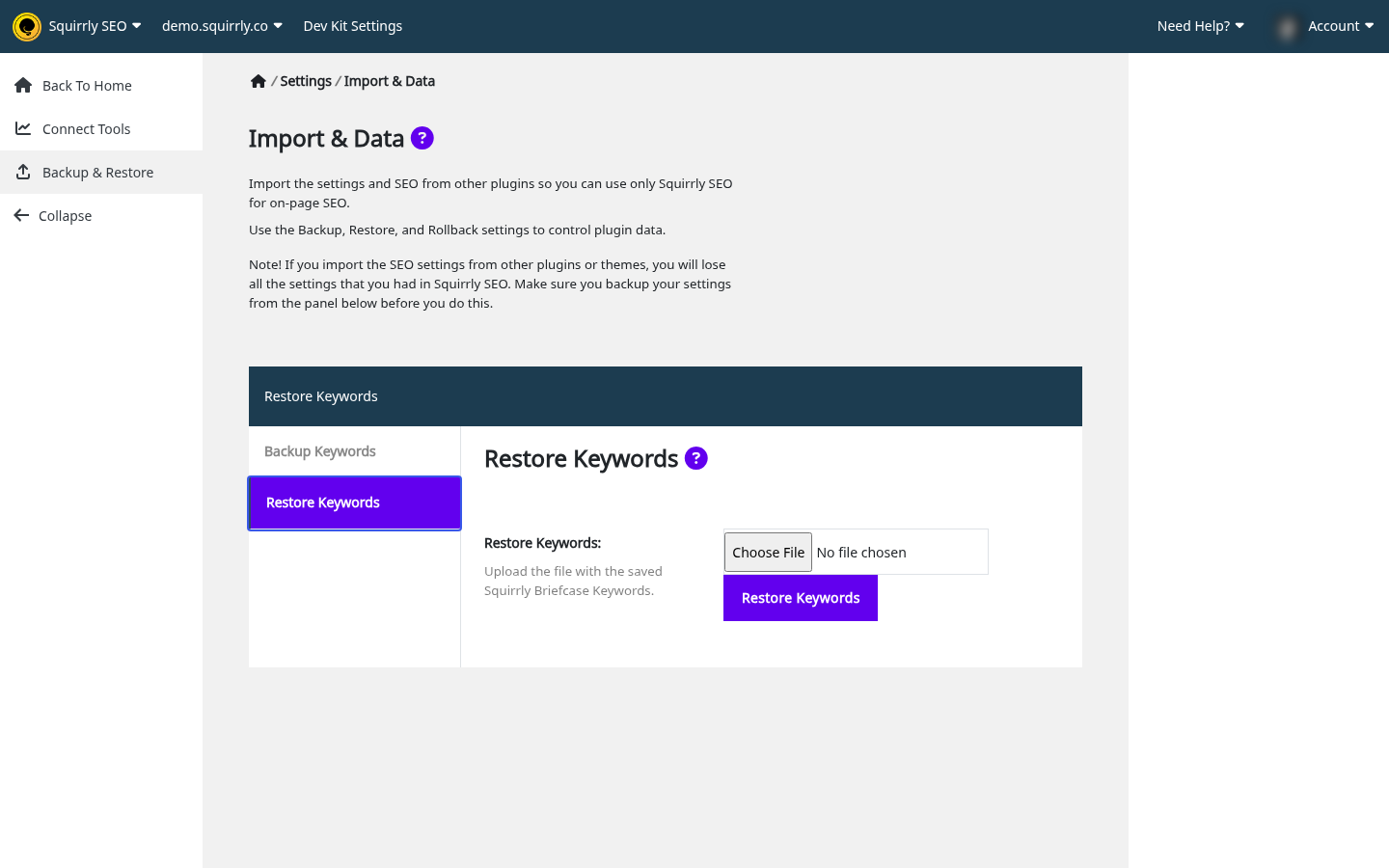
This screen backs up your Briefcase keywords and nothing else. Its heading is Import & Data, and the intro text about importing from other plugins doesn’t apply to the Cloud.
| Tab | What it does | Button |
|---|---|---|
| Backup Keywords | Backup Briefcase: “Download all Briefcase Keywords.” | Download Backup |
| Restore Keywords | “Upload the file with the saved Squirrly Briefcase Keywords.” | Restore Keywords |
The plugin’s own backup has more options. See Import and Data.
Team members
The Cloud has no team members, sub-users or invitations. To let writers work under one account, use WordPress users and the plugin, as this FAQ shows. Client sites on a Dev Kit plan are websites on the agency’s account, and clients don’t get a login.
AppSumo accounts
Applying a code makes the account an AppSumo account. How do I redeem my AppSumo code? has the steps. These accounts look different in a few places:
| Screen | What’s different |
|---|---|
| Account Info | No Upgrade your account or Billing info links. A block Stacking an AppSumo Code: with Stack an AppSumo Code |
| Pricing & Plans | Stacking an AppSumo Code: with the field AppSumo Code:, the button Apply Code, and a table of Current Plan against the next tier. Upgrade Now opens the same form in a pop-up |
| Dashboard, Lite plan | “Stack the AppSumo Codes to unlock the Cloud App” and Add AppSumo Code >> |
| Billing | The links are hidden |

A code has to exist, be unused and not be refunded. Each code you apply moves the account up one tier. At the last tier the form disappears, and another code is refused and stays unused. These plans have no end date.
To see what your account includes, open Account Info.
Other account sources
Apart from Dev Kit, the menu depends on how the account was created, and your plan doesn’t change it.
| How the account started | What’s different |
|---|---|
| Signed up on cloud.squirrly.co | Standard menu. Plans on offer: PRO, WEB DEV KIT, BUSINESS |
| Signed up from the WordPress plugin | Same as above |
| AppSumo | See AppSumo accounts. No Billing links |
| Premium SEO Pack or Quick SEO by Squirrly | Standard menu with a shorter list of plans |
Troubleshooting
I can’t change my email address
The field is locked and the server ignores any change to it. Contact support.
Billing is empty, but I have a plan
Free and AppSumo plans don’t appear there, because only FastSpring and Paddle subscriptions are listed.
Limits dropped with no warning
A paid plan that ended falls back to Free with no notice. Check Due Date: on Account Info and renew.
I deleted my account and I’m still being charged
Deleting doesn’t cancel the subscription. Cancel it from Options in Billing before you delete, or contact support if the account is already gone.
Stack an AppSumo Code opens a page with no form
Your account is at the last tier.
Frequently asked questions
When do my keyword researches come back?
On the Reset day shown on Account Info.
Can two people share a Squirrly Cloud account?
An account is one login, and the Cloud has no team members.
Where do I download invoices?
Go to Account > Billing, click the Subscription ID, then View invoice.
Do unused credits carry over?
The counters go back up to the plan value, and a balance higher than that stays.
Which plan includes Google Rankings?
The Business plan or the Web Dev Kit plans.
Related tutorials
- Squirrly Cloud App: the menu and what each screen is for.
- Websites in Squirrly Cloud: website limits and Limit Exceeded rows.
- Squirrly Cloud notices and errors: messages about limits and plans.
- How do I redeem my AppSumo code?: apply a code.
- What is License Stacking?: add up plans.
- Web Dev Kit in Squirrly Cloud: Dev Kit plans.





0 Comments