JSON-LD Video Schema
Squirrly SEO adds a VideoObject schema to a page when its JSON-LD type is Video, using the first video it finds in the content. You pick Video for one page in the SEO Snippet, or for a whole post type in Squirrly > Optimize > Automation.
Google reads the VideoObject to show the page as a video result. The general JSON-LD settings are in JSON-LD Structured Data.
Which video Squirrly picks
Squirrly reads the page content after you save it, so a video pasted into a post is found on the next update. It stops at the first match, in this order:
| Order | Where the video is | Thumbnail used |
|---|---|---|
| 1 | The ACF field _sq_video, when Advanced Custom Fields is active | The YouTube thumbnail for YouTube links, otherwise the first image of the post |
| 2 | A YouTube embed (youtube.com/embed/... or youtu.be/...) | The first image of the post |
| 3 | A YouTube link (youtube.com/watch?v=...) | The YouTube thumbnail of the video |
| 4 | A Wistia video | The first image of the post |
| 5 | A video file in the content, such as .mp4, .mov or .wmv | The first image of the post |
A page with none of these gets no VideoObject, even with Video selected.
What goes into the schema
| Schema property | Where it comes from |
|---|---|
name | The SEO title of the page, cut at JSON-LD Title Length |
description | The meta description, cut at JSON-LD Description Length |
uploadDate | The publish date of the post |
thumbnailUrl | The thumbnail from the table above |
embedUrl | The video URL |
publisher | Your Organization from Rich Snippets > Company |
The title and the description are the ones in the Meta Tags tab of the SEO Snippet, so change them there.
Set Video for one page
- Open the page in the editor and scroll to the SEO Snippet box, or open it from Bulk SEO.
- Go to Rich Snippets.
- Select Video in Schema Types. Hold Control (Command on a Mac) to keep the types already selected.
- Click Save.
- Click Validate JSON-LD to check the video in the Google Rich Results Test (see Validate the JSON-LD).
With the Advanced Pack
The Advanced Pack replaces the list with Add New Schema, and a Video form can also be saved as a reusable schema. Pick Video and you get a form you can change field by field:
| Field | Filled by default with | Required |
|---|---|---|
| Headline | {{title}} | Yes |
| Description | {{excerpt}} | No |
| Upload Date | {{date}} | Yes |
| Content URL | {{video}}, the video found in the content | Yes |
| Embed URL | Empty | No |
| Duration | Empty, in ISO 8601 format | No |
| Views | Empty | No |
| Video Thumbnail | {{image}} | Yes |
| Clip | Name, Start Offset, End Offset and Url of a part of the video | No |
A Video schema missing a required value isn’t published, and the list says “Not published yet – Google needs:” followed by the missing fields.
Set Video for a whole post type
- Go to Squirrly > Optimize > Automation.
- Click the post type in Automation – Configurations.
- Check that Load JSON-LD Structured Data is on.
- Add Video in JSON-LD Type.
- Click Save Settings.
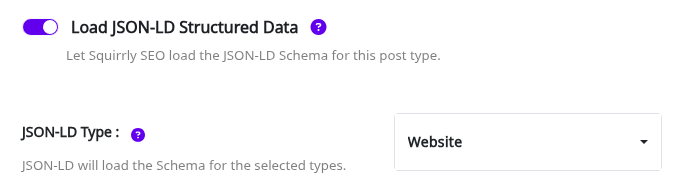
Do this only for a post type where every page has a video, such as a custom post type for recipes with a cooking video. Automation explains the other switches on that tab.
Advanced Custom Fields plugin integration
Use an ACF field when the video isn’t in the content, or when you want a different video in the schema.
- In ACF, add a field with the field name
_sq_videoto the post type. - On each post, paste the URL of the video in the new field.
- Set the JSON-LD type of the post to Video and update the post.
The ACF field comes before any video in the content. For a YouTube watch link, Squirrly uses the YouTube thumbnail of that video.
Troubleshooting
The VideoObject is missing from the page
Squirrly found no video it can read. Check that the video is in the content as one of the formats in the table, then update the post.
The thumbnail is the wrong image
For embeds and video files, Squirrly takes the first image of the post. Set the featured image, or use a YouTube watch link in _sq_video.
“JSON-LD is disable for this Post Type”
Turn on Load JSON-LD Structured Data for that post type in Squirrly > Optimize > Automation.
Frequently asked questions
Does Squirrly read Vimeo videos?
Not automatically, so paste the Vimeo URL in the _sq_video ACF field or in Content URL with the Advanced Pack.
Can a page have Video and Article at the same time?
Yes, select both types and Squirrly prints both schemas in the same @graph.
Which video is used when a post has several?
The first one Squirrly finds, in the order of the table above.
Related tutorials
- JSON-LD Structured Data: the Rich Snippets settings and the schema type per post type.
- Automation: set Video as the JSON-LD type for a post type.
- How can Squirrly help me rank my videos?: the other tools for video pages.
- Use ACF fields in Squirrly SEO schemas: fill any schema field from ACF.