AI Consultant (Next SEO Goals)

The AI Consultant, called Next SEO Goals in earlier versions, checks your site and lists the SEO goals to work on next. Open it from the See Next SEO Goals from AI Consultant button on Squirrly > Home, or from AI Consultant in the Squirrly menu of the WordPress admin bar.
The screenshots come from demo.squirrly.co, a test store for cat food, with Squirrly SEO 14.2.11 and the Advanced Pack 2.5.12.
What the AI Consultant does
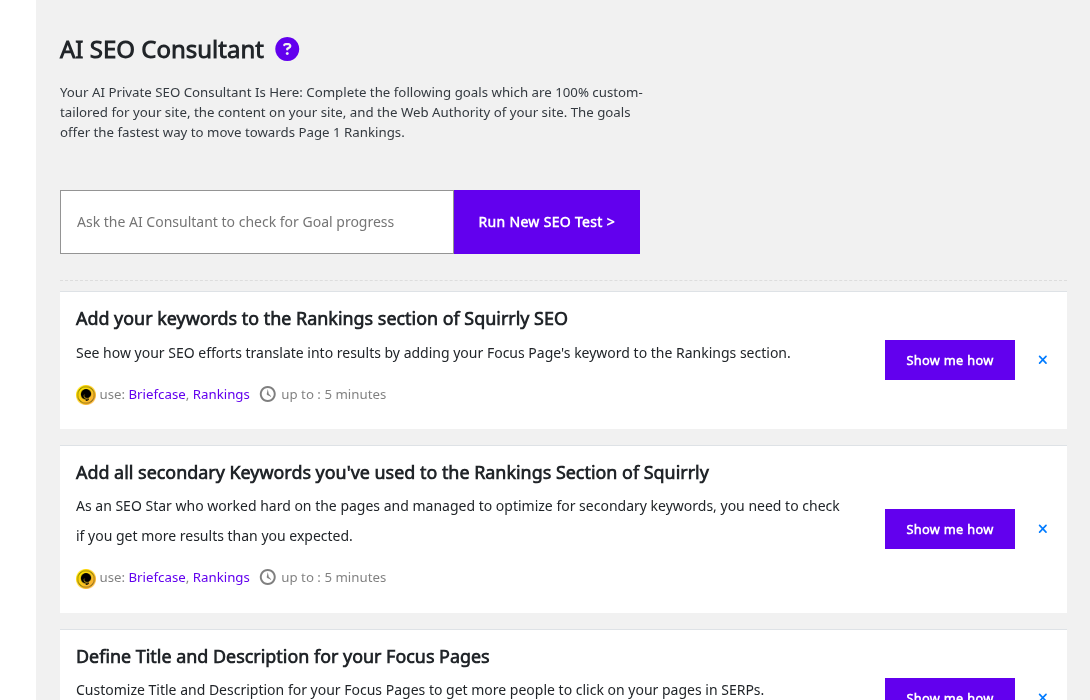
The screen is called AI SEO Consultant. Its card in All Features says it uses “over 100+ signals” to prepare goals that take you closer to the first page of Google.
Each goal has a title, one line on what’s wrong, the Squirrly features to use after use:, and the time it takes after up to:. On the demo site, “Define Title and Description for your Focus Pages” listed Focus Pages and SEO Snippet, up to 5 minutes.
Squirrly picks 3 goals for each day. Urgent goals are added on top of those 3, so a site with serious problems can see more. The goals depend on your site, which is why two sites rarely get the same list (see How unique are the Next SEO Goals).
The AI Consultant needs the site connected to Squirrly Cloud. Without the connection it shows the connect screen.
Where to find it
The AI Consultant isn’t in the left Squirrly menu. Use one of these.
| From | Click |
|---|---|
| Squirrly > Home, notice at the top | See Next SEO Goals from AI Consultant |
| Squirrly > Home, Main Features | The card Get AI Assistants: Next SEO Goals |
| The Squirrly menu in the WordPress admin bar | AI Consultant |
| Squirrly > All Features, section Unique SEO Features | see feature >> on the Next SEO Goals card |
The notice on Home counts the open goals, for example “The AI SEO Consultant has 1 Action Items you should check to improve your rankings right away.”

Run a new SEO test
Squirrly runs the first check on its own after the onboarding. After that, opening Home starts a new check in the background when the last one is older than 12 hours. You can also run one whenever you like.
- Open the AI Consultant.
- Click Run New SEO Test >, or click the box next to it that reads “Ask the AI Consultant to check for Goal progress”.
- Wait while the window Website SEO Check fills its progress bar. It says the check may take up to 1 minute.
When the check ends, the list reloads and scrolls to the goals.
Changed a Focus Page? Request a new Focus Pages audit first. The tip on the screen says the AI Consultant should run its test after that re-audit, so the goals use the new data.
When all goals are done
With no open goals left, the button changes to Load more goals if exist >> and the line Next goals on: shows tomorrow’s date. Click the button to check again for goals beyond today’s 3.
Complete a goal
- Click Show me how on the goal. The Task Details window opens.
- Read the description and the SOLUTION part, which lists the steps.
- Click Let’s do this to open the Squirrly screen where you fix it, in a new tab. Goals without a link to a Squirrly screen don’t have this button.
- Do the steps from the solution.
- Back in the window, click Mark As Done.
The goal leaves the list. The next SEO test checks it again.
| What the next test finds | What you see |
|---|---|
| The problem is fixed | The goal shows Goal completed. Good Job! |
| The problem is still there | The goal comes back with Goal is not done! under Show me how |
Mark As Done only hides the goal until that test. It doesn’t change anything on the site.
Goals the demo site got
| Goal | Use | Up to |
|---|---|---|
| Add your keywords to the Rankings section of Squirrly SEO | Briefcase, Rankings | 5 minutes |
| Add all secondary Keywords you’ve used to the Rankings Section of Squirrly | Briefcase, Rankings | 5 minutes |
| Define Title and Description for your Focus Pages | Focus Pages, SEO Snippet | 5 minutes |
The first two goals send you to the Briefcase to track keywords in Google Rankings. The third one opens the SEO Snippet of each Focus Page, where you write its title and description.
Ignore a goal
A goal you don’t want to work on can leave the list, and Squirrly stops showing it.
- Click the x at the right of the goal.
- Confirm “Do you want to ignore this goal?”.
Or open Show me how and turn off the active task switch at the top of the Task Details window.
Bring back ignored goals
Under the list, Show hidden goals has a red number with the count of ignored goals. Click it and all of them return to the list.
Progress & Achievements
Completed goals and better results show up as success messages on Squirrly > Home. The AI Consultant tip says “Keep completing goals and you’ll see Progress and Achievements messages”.
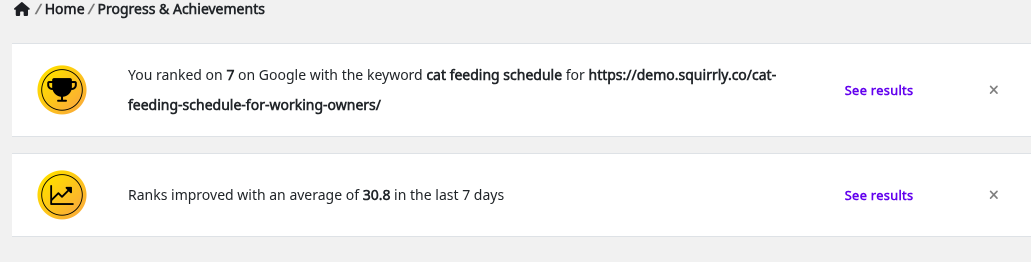
The All Features card says the block “Displays Success Messages and Progress & Achievements for SEO Goals, Focus Pages, Audits, and Rankings”. The plugin has messages for better Traffic, Ranking, Time On Page, Authority, Social Signals and Loading Speed on your Focus Pages. Two more cover better Ranking for your Keywords and a better Score for your Audit.
- See results opens the screen behind the message, for example Focus Pages.
- The x hides one message, and Show hidden success brings them back.
The block appears on Home only while there’s at least one message. Audit progress and ranking progress show the numbers behind them.
Troubleshooting
“Checking the website …” doesn’t end
The check can take up to 1 minute. If the page reloads with the same goals, the check failed, so reload once more and run Run New SEO Test > again.
“Goal is not done!”
You marked the goal as done, but the last test still found the problem. Open Show me how, do the steps in SOLUTION and run a new test.
A fixed Focus Page goal keeps coming back
The goal reads the last Focus Pages audit. Request a new audit of that page in Focus Pages, then run the SEO test.
“You do not have permission to perform this action”
Running tests and changing goals needs the Squirrly SEO Editor role or higher. Ask an administrator for it.
Frequently asked questions
Where did Next SEO Goals go?
It’s the AI Consultant now, and the Main Features and All Features cards still use the name Next SEO Goals.
How many goals do I get each day?
Three, plus any urgent goal Squirrly finds.
Does Mark As Done fix the problem?
No, it only hides the goal until the next SEO test checks the site again.
Can I see a goal I ignored by mistake?
Yes, click Show hidden goals under the list.
Related tutorials
- Focus Pages & Page Audits: most goals point to the red elements of a Focus Page.
- Install Squirrly SEO Plugin: the onboarding that runs the first SEO check.
- How Unique Are The Next SEO Goals?: why each site gets its own list.
- SEO Audit Suite: the audit score behind the audit goals and success messages.
- Squirrly SEO Live Assistant: optimize a Focus Page for its main keyword.