Does Squirrly SEO Offer Any Internal Linking Features?
With Squirrly SEO, you get access to:
- Inner Links Assistant in Squirrly > Focus Pages > Inner Links (two parts: one that finds link opportunities in all your previous content, and one that helps you build new inner links). Read more details here.
- Inner link suggestions in Squirrly > AI Research > Suggested, part of Keyword Research. Next to a suggested keyword you’ll find the Add to Inner Links option, and the Related Questions Found list gives you ideas for more content to link to. Read more details here.
Plus, the My articles tab of the Blogging Assistant (shown below) in the Squirrly Live Assistant lets you search the existing content on your site. That way you can see if you’ve written about the Main Keyword before and add references or internal links.
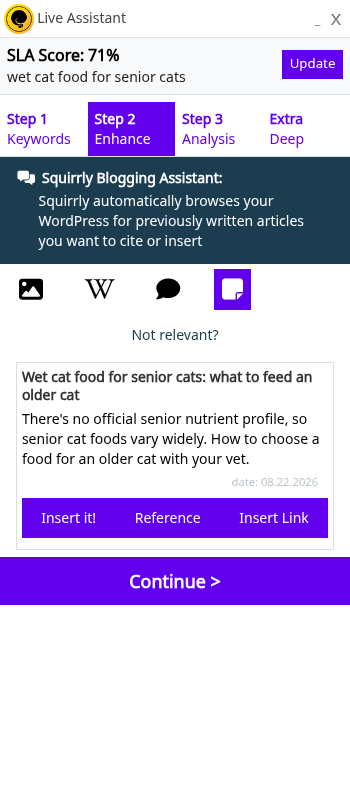
You can even add snippets of other articles you’ve already written, along with the inner link and the reference to your own content.
More details about Squirrly’s Blogging Assistant here.
Also, for each Focus Page, Squirrly runs an Inner Links check. It uses the internal WordPress data to see if you’ve added links from other pages on your WP site to that Focus Page.