Focus Pages & Page Audits
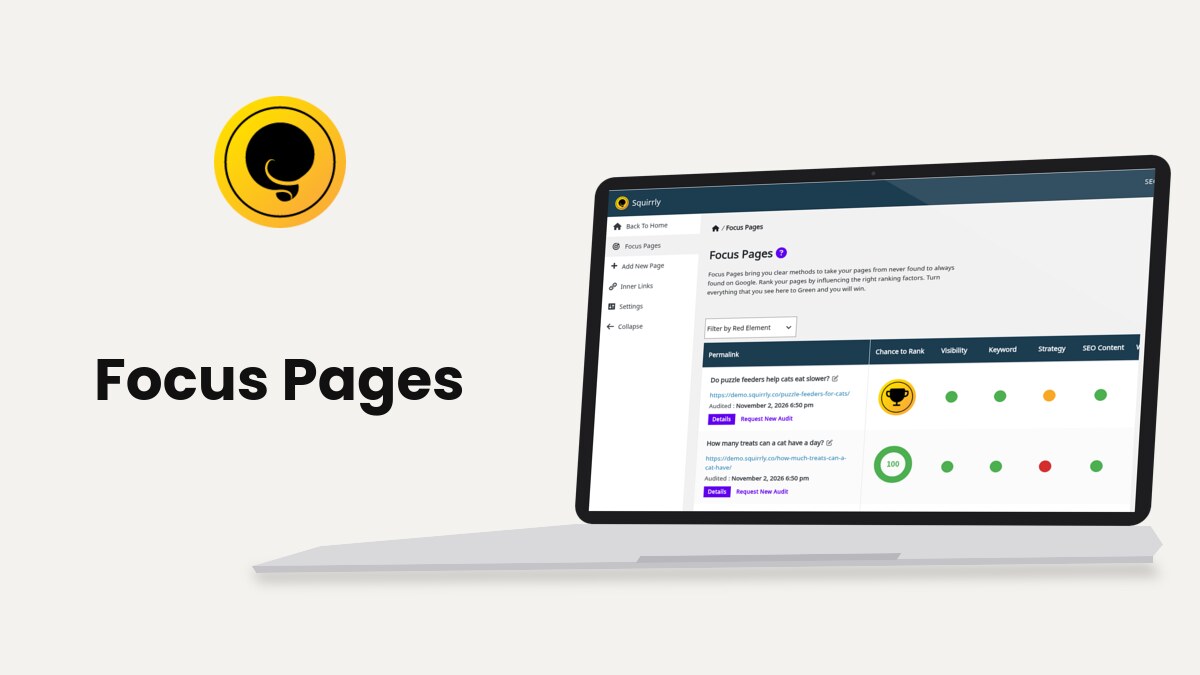
Focus Pages, at Squirrly > Focus Pages, audit the pages you most want to rank and turn each ranking factor into a task with a red, yellow or green circle. This guide covers the three screens of the section: the Focus Pages list, Add New Page and the details of one page.
The screenshots come from demo.squirrly.co, a test store for cat food, with Squirrly SEO 14.2.10 and the Advanced Pack 2.5.12. Its Focus Pages were added on November 2, 2026.
What Focus Pages do
You pick a page and a main keyword. Squirrly Cloud audits the page and returns 19 categories of tasks, from Visibility to Clicks, plus a Chance to Rank score. The audit needs the plugin connected to Squirrly Cloud.
The main keyword comes from the Live Assistant. Optimize the page for a keyword from the Briefcase before you add it, or the Keyword category shows “No Keyword found in Squirrly Live Assistant”. Focus Pages and the Live Assistant explains how the two work together.
Which pages to add
Add the pages that bring the result you want from search: a product, a service page or a long guide. The demo store’s list has five blog posts, from “Do puzzle feeders help cats eat slower?” to “How to tell if your cat is overweight”.
The number of Focus Pages comes from your plan. The tip under the list on the demo account says “Focus Pages Business: Add maximum 10 page(s) in Focus Pages and request a new audit for each page every 5 mins.”

Where to find it
Open Squirrly > Focus Pages in the WordPress menu. The left menu of the section has four screens.
| Screen | What you do there |
|---|---|
| Focus Pages | See every Focus Page with its Chance to Rank and its task circles |
| Add New Page | Search your content and click Set Focus Page |
| Inner Links | Manage the links that point to your Focus Pages (shown when the Inner Links Assistant is on) |
| Settings | Settings of the Inner Links Assistant |
Administrators, Editors and the Squirrly SEO Admin and Squirrly SEO Editor roles can open Focus Pages. Only administrators and Squirrly SEO Admins can change the Settings screen.
How to add a Focus Page
Before the first page, the list shows Welcome to Focus Pages and a button, Add a new page as Focus Page to get started, that opens the same screen as the steps below.
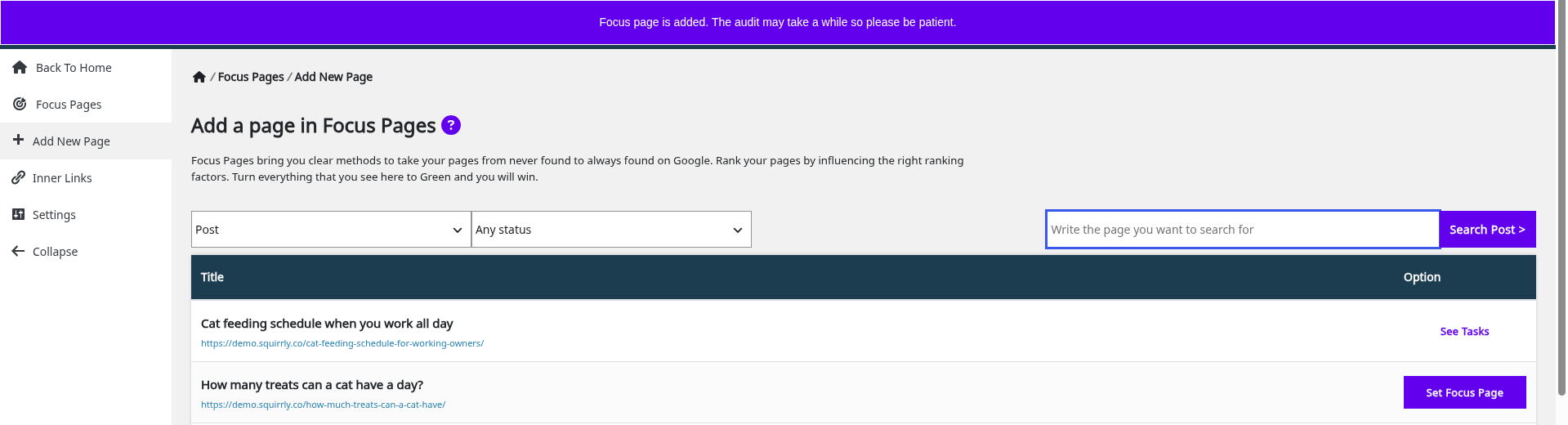
- Go to Squirrly > Focus Pages > Add New Page.
- Pick the content type in the first list (Post, Page, Product, Shop and the other types of your site) and a status in Any status.
- Type part of the title in Write the page you want to search for and click Search Post >, or scroll the list.
- Click Set Focus Page next to the page.
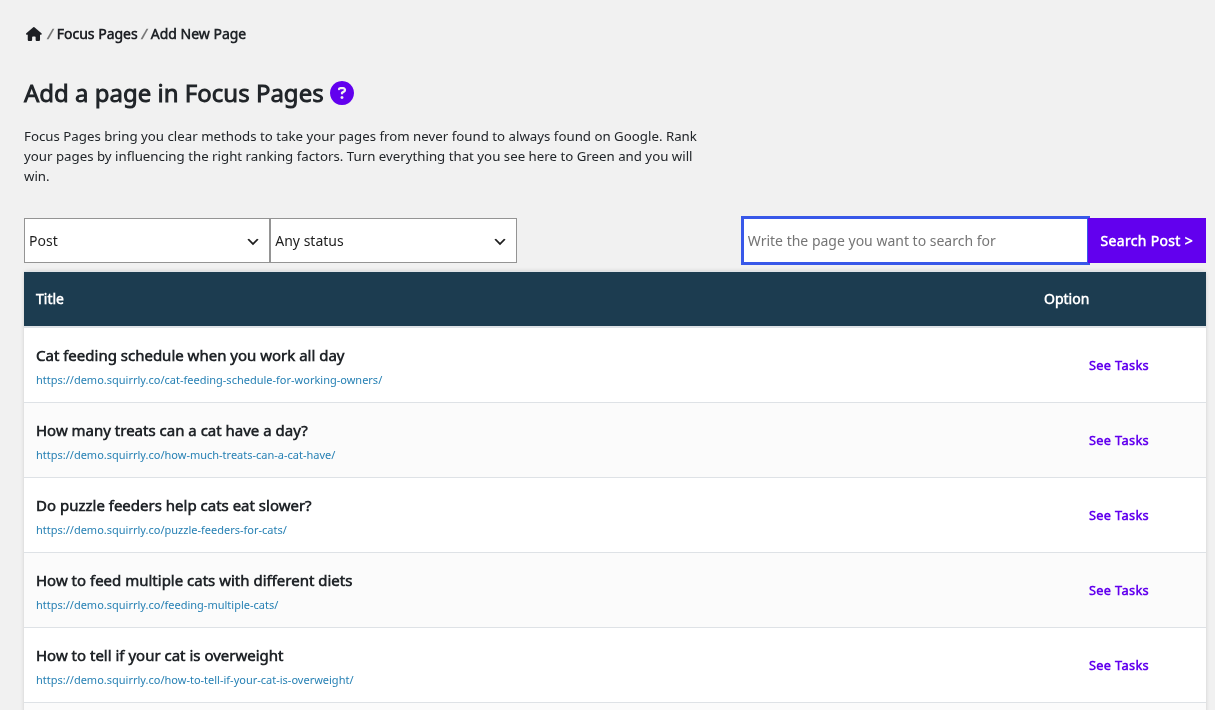
The top of the screen shows “Focus page is added. The audit may take a while so please be patient.” The button changes to See Tasks, which opens the Focus Pages list.
The first audit takes between 1 and 5 minutes. Until it’s ready, the row shows “Currently processing data. Please refresh in a few minutes.”
Only published content can be added. A draft gets “Error! This focus page is not public.”, and an item without a WordPress ID shows Can’t be added instead of the button.
Request a new audit
Click Request New Audit under the page in the list after you change the page or complete a task. The link changes to In progress. The same option in the three-dot menu shows “Focus page sent for recheck. It may take a while so please be patient.” For the next 5 minutes the row shows a Wait label with the minutes left.
Read the Focus Pages list
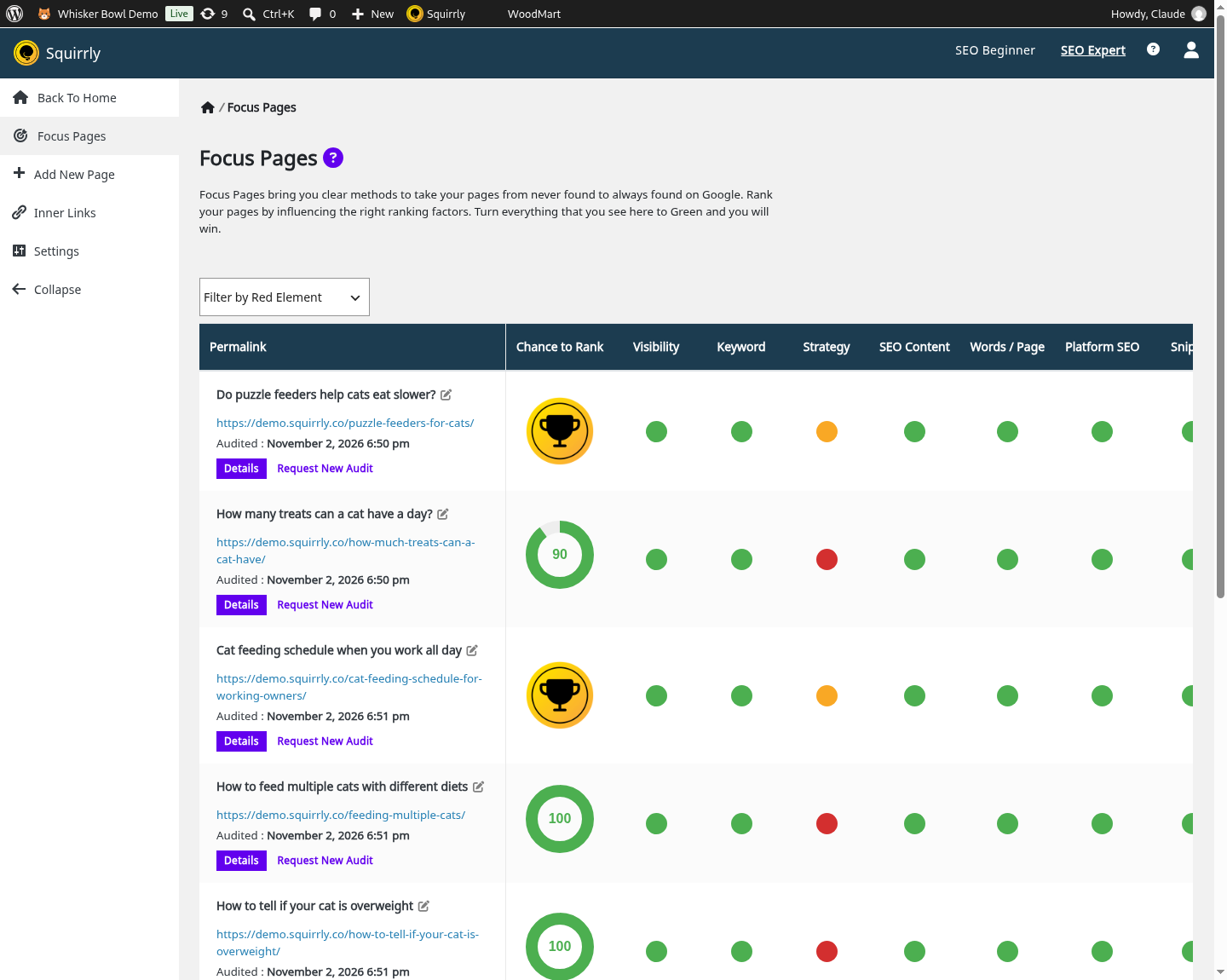
The list at Squirrly > Focus Pages has one row per page. The first column shows the title, the URL, the date of the last audit and two links: Details and Request New Audit.
See what a red dot needs
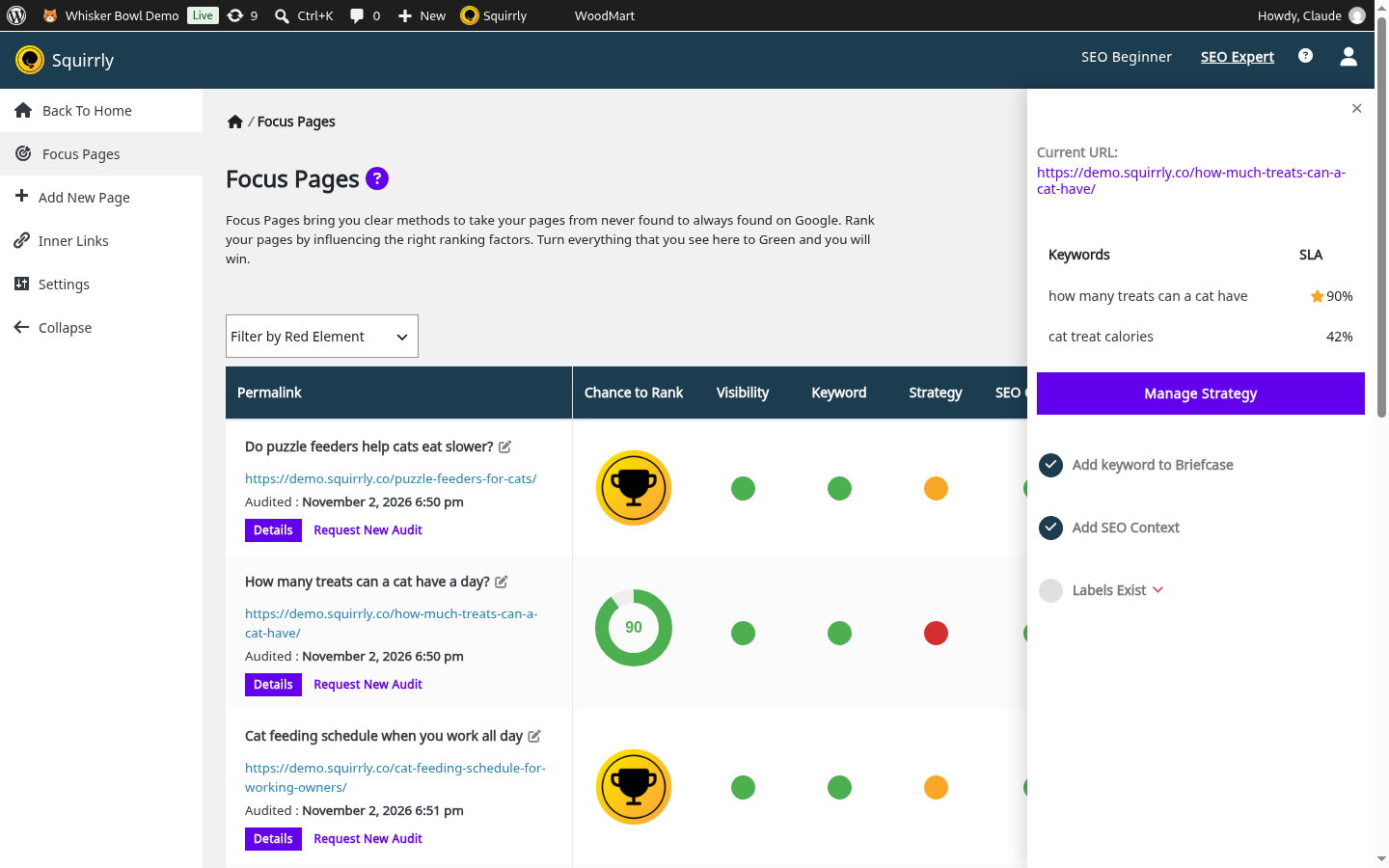
Click any dot in the list. A side panel slides in with the tasks of that category and a check mark next to each one that is done. Click a task to open Task Details: it says what is wrong now and how to fix it. Close the panel with the x, the Esc key or a click outside it.
On the demo store, “How many treats can a cat have a day?” has a red Strategy dot. Its tasks show Add keyword to Briefcase and Add SEO Context done, and Labels Exist not done.
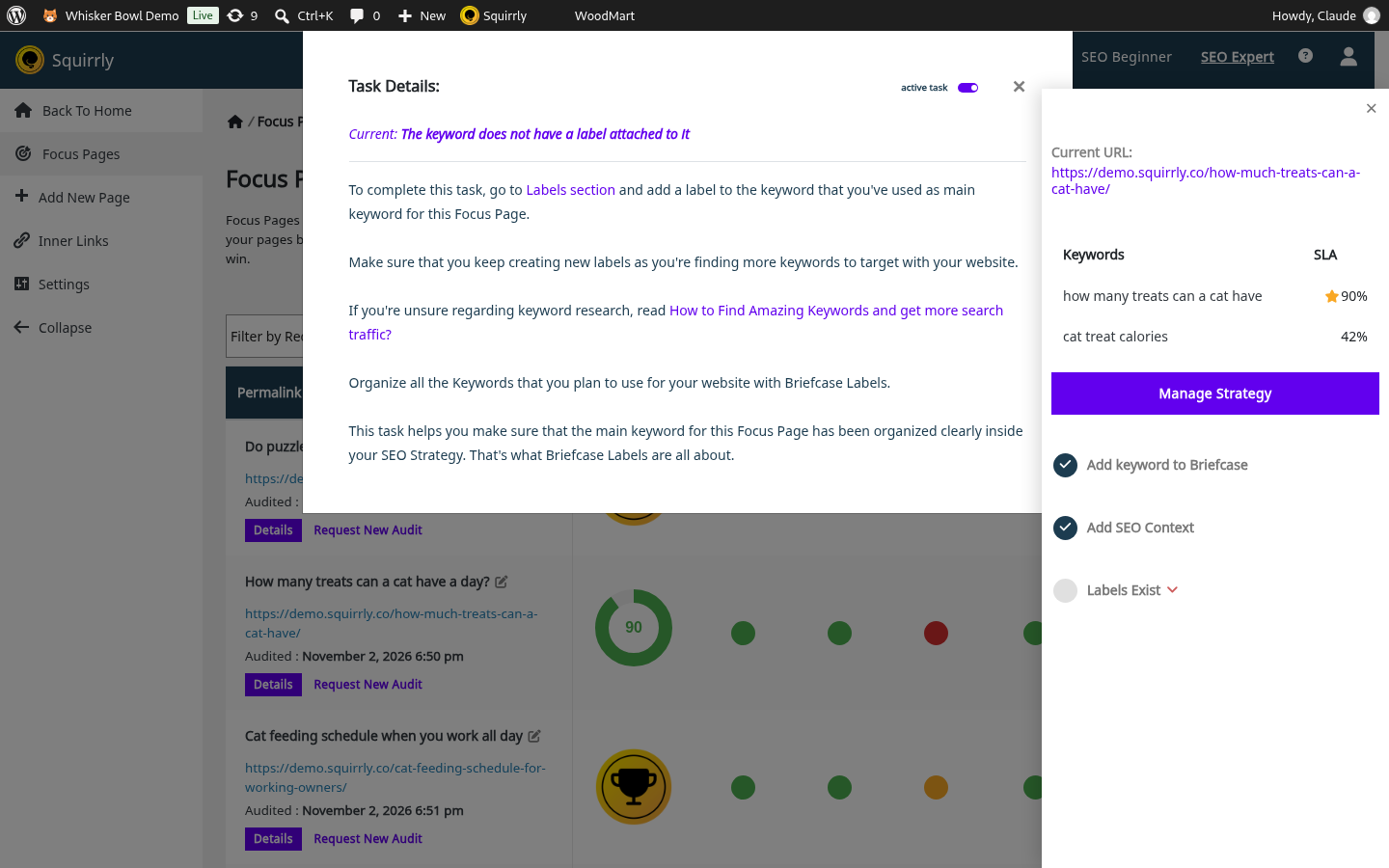
The fix is in the Briefcase labels: give the main keyword of the page a label, then click Request New Audit on the row. The dot turns green after the new audit.
Use Filter by Red Element to narrow the table to one category that has red tasks, for example Snippet. Refresh Filter shows all the columns again.
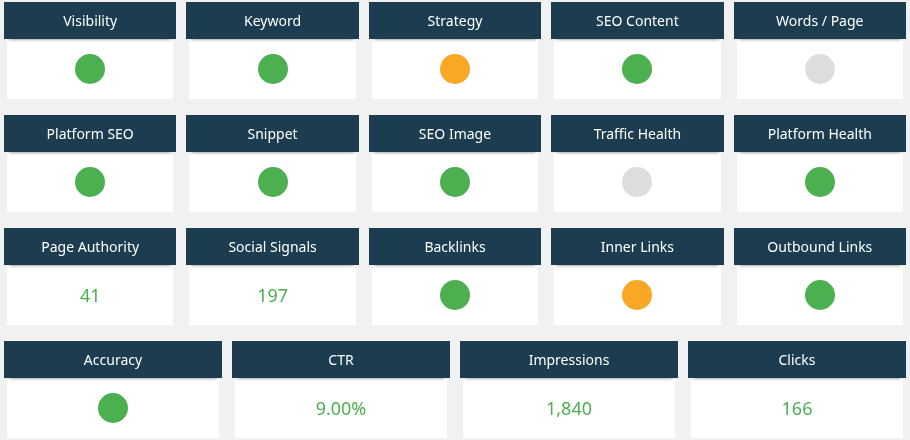
Details opens Focus Pages Details for one page. It adds four boxes for the latest 90 days: Chances of Ranking, Progress & Achievements, Keyword Ranking and Page Traffic. Progress & Achievements lists gains such as a higher rank, more page traffic or new social shares, or “No progress found yet” on a new page. Keyword Ranking and Page Traffic appear once there is enough ranking and traffic data.
Under the boxes, the same categories sit in a grid. On the demo store, “Do puzzle feeders help cats eat slower?” shows Page Authority 41 and a CTR of 9.00%. Its Impressions read 1,840 and its Clicks 166.
Inspect a Focus Page URL
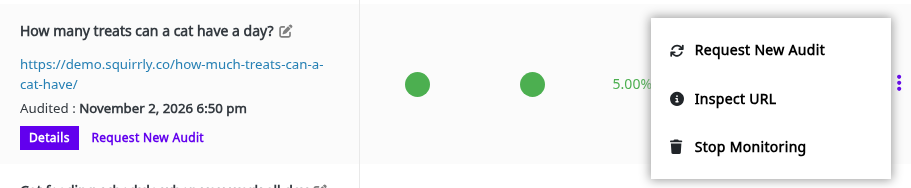
Open the three-dot menu at the end of a row and click Inspect URL. The Squirrly Inspect URL window opens with a report of that page from Squirrly Cloud. Inspect URL explains the report.
Stop monitoring a Focus Page
- Open the three-dot menu of the page.
- Click Stop Monitoring.
- Confirm “Are you sure? You can always monitor it again in the future.”
The message is “The focus page is removed from monitoring”, and the slot is free for another page. Replacing a Focus Page with another covers what happens to the work you did.
Chance to Rank
Chance to Rank is a score from 0 to 100 for the main keyword of the page. The plugin’s tooltip says it’s calculated by Squirrly machine learning, and that the fastest way to raise it is to complete Visibility, Keyword Competition, Content Optimization, Content Length, Social Signals, Daily Traffic, Inner Links and External Nofollow Links.
The circle is red under 50, orange from 50 and green from 90. A page that ranks in the top 10 of Google shows a Top 10 badge (a trophy) instead, with “Congratulations! You ranked on” and the position in its tooltip. On the demo store, two posts show the trophy and the other three show 100.
The column shows N/A when the page has no main keyword or isn’t published.
What the colors mean
Every circle in a row is one category. Click it, and the side panel lists the tasks of that category with what to do for each one.
| Color | What it means |
|---|---|
| Green | All tasks of the category are complete |
| Red | At least one task is not complete |
| Yellow | Tasks are incomplete, but the page already ranks in the top 10 |
| Gray | Squirrly has no data for the category yet, for example the page has no keyword in the Live Assistant |
Google Analytics and Google Search Console feed the traffic, CTR, Impressions and Clicks tasks. Connect them in Squirrly > Technical SEO > Connect Tools.
The task categories
The numbers below are the thresholds written in the plugin for Squirrly SEO 14.2.10.
Visibility
The tasks are Yes, do index, Yes, do follow, Present in sitemap, Manual index request, Canonical link and Permalink structure is good. The page must not be blocked by a noindex, by robots.txt or by a canonical that points to another URL. Check the page’s visibility in Bulk SEO and the Sitemap XML settings.
Manual index request stays red until you click Ask Google to Re-Index >> in the panel. It opens your site’s property in Google Search Console and copies the page address. Paste it in Inspect any URL at the top of Search Console, then click Request indexing. The task is marked complete on that click. Without Search Console connected, the panel shows Connect Google Search instead.
Keyword
The task is Keyword Competition. The main keyword should have low competition, as measured by keyword research.
The panel lists the page’s keywords with their Live Assistant score (SLA). The main keyword has a star. Click a keyword to open Change Main Keyword, pick it under Main Keyword and click Save Main Keyword. The window warns “Note! You need to request a new Focus Pages audit to update the report!” (more on changing the main keyword).
Strategy
The tasks are Add keyword to Briefcase, Add SEO Context (optimize to 30% for a secondary keyword) and Labels Exist. The last one needs a Briefcase label on the main keyword.
SEO Content
The tasks are Optimize to 75% (in the Live Assistant), Snippet is green, Platform SEO is green and Fresh content update, which needs an edit in the last 3 months.
Words / Page
The tasks are Write 1500 words and Reader’s Experience, which needs an average time on page of 2 minutes in Google Analytics.
Platform SEO
The tasks are Enhance your sitemap (images and videos in the sitemap), Post Type settings activated, SEO Automation activated and Robots File. The page’s post type must be on in Automation, and the robots.txt file must not block it.
Snippet
The tasks are Title, Description, Keyword in title, Keyword in description, Open Graph – full definition, Twitter Cards – full definition, JSON-LD definition and Customized. Edit them in the page’s SEO Snippet and write your own title and description with the main keyword in both.
SEO Image
The task is Keyword in filename. One image on the page should have the main keyword in its file name. For the keyword “wet cat food” that’s wet-cat-food.jpg, uploaded again under the new name.
Traffic Health
The tasks are Below 50% Bounce Rate, Time on page is 2 minutes, 70 visitors / day / page and Just one Google Analytics tracking code. The data comes from Google Analytics.
Platform Health
The tasks are Audit score is over 70%, No duplicate titles, No duplicate description, No empty titles, No empty descriptions, SEO speed (2 seconds or less) and Mobile-friendly. They come from the site audit in GEO Audit.
Page Authority and Backlinks
Page Authority has one task, Authority over 35, with the Moz page authority. Backlinks, the next column, has At Least 100 MOZ BackLinks, At Least 30 Referring Domains and At Least 100 Majestic SEO Links.
Social Signals
The task is 100 Shares. The task text says it counts shares from trackable sources only, and that Twitter and LinkedIn share counts are no longer available.
Inner Links
The task is Get 5 inner links, with 20 recommended. Squirrly counts the links in the content of your other posts. When the Inner Links Assistant is on, the panel has an Inner Links Assistant button that opens Inner Links.
Outbound Links
The task is Maintain authority. The task text asks for a nofollow attribute on all links from the Focus Page to other sites, and lists the external dofollow links it found. SEO Links can add nofollow to external links site-wide.
Accuracy
The task is Rank accuracy. The task text says the SERP Checker on the Free and Pro plans uses Google Search Console data, which is an average position, and points to the Business plan for exact positions. Ranking & SERP Checker covers rankings.
CTR, Impressions and Clicks
These three read Google Search Console data for the main keyword of the page.
| Category | Task | Target |
|---|---|---|
| CTR | Clickthrough rate | Above 5% (5 clicks from 100 impressions is 5%) |
| Impressions | Search Results Impressions in the last 3 months | 100 |
| Clicks | Clicks from Search Engine in the last 3 months | 10 |
Because they count one keyword, the numbers can be lower than the page totals in Search Console (why scores differ from other tools).
Troubleshooting
“You have reached the maximum number of focus pages for this website”
The plan’s Focus Pages are used up, and the number in the message is your plan’s limit. Stop monitoring a page you no longer work on, then add the new one.
“You’ve made too many requests, please wait a few minutes.”
A new audit for the same page was requested less than 5 minutes after the last one. Wait until the Wait label goes away.
“Focus Page was not found (error 404)” or “Focus Page could not be verified”
The Squirrly crawler couldn’t load the page. If it happens on all pages, ask your host to whitelist the crawler IP 5.161.83.61. If it’s only one page, stop monitoring it, add it again and request an audit. Focus Page crawling error with Cloudflare has the Cloudflare steps.
“Your Focus Page is redirected to another page (error 301)”
The URL redirects. Pick the final URL, the one that doesn’t redirect, as the Focus Page.
“Focus Page could not be found on your website. Delete the Focus Page and add it again.”
The post was deleted or its ID changed. Stop monitoring the row and add the page again from Add New Page.
Frequently asked questions
Can a WooCommerce product be a Focus Page?
Yes, pick Product in the first list of Add New Page.
How long does an audit take?
Between 1 and 5 minutes, according to the tip on the Focus Pages screen.
How often can I request a new audit?
Once every 5 minutes for each page.
Why are some circles gray?
Squirrly has no data for that category yet, for example because the page has no keyword in the Live Assistant.
Related tutorials
- An introduction to Focus Pages and the power they have for SEO: the Squirrly course lesson on Focus Pages.
- Inner Links: send links from your other posts to your Focus Pages.
- Inspect URL: check one page live after you fix a task.
- Keyword Research and SEO Strategy: find the main keyword for each Focus Page.
- Squirrly SEO Live Assistant: optimize the page to 75% for its main keyword.
- GEO Audit: the site audit behind Platform Health.
- Should a new Focus Page be a post or a page?