Can I verify Bing Webmaster Tools and Google Search Console at the same time?
Yes, Squirrly prints the Bing and the Google verification meta tags on your home page together, so a site verified in Google Search Console can be verified in Bing Webmaster Tools too.
| Service | Field in Squirrly | Meta tag |
|---|---|---|
| Bing Webmaster Tools | Bing Webmaster Tools on the Webmaster Extras tab | msvalidate.01 |
| Google Search Console | Google Search Console on the Place Trackers tab | google-site-verification |
Add the Bing code
- In Bing Webmaster Tools, add your site and pick the HTML meta tag method.
- Copy the meta tag, or only the code inside
content="...". - Go to Squirrly > Technical SEO > Connect Tools and open Webmaster Extras.
- Paste it in Bing Webmaster Tools and click Save Settings.
- Go back to Bing and click its verify button.
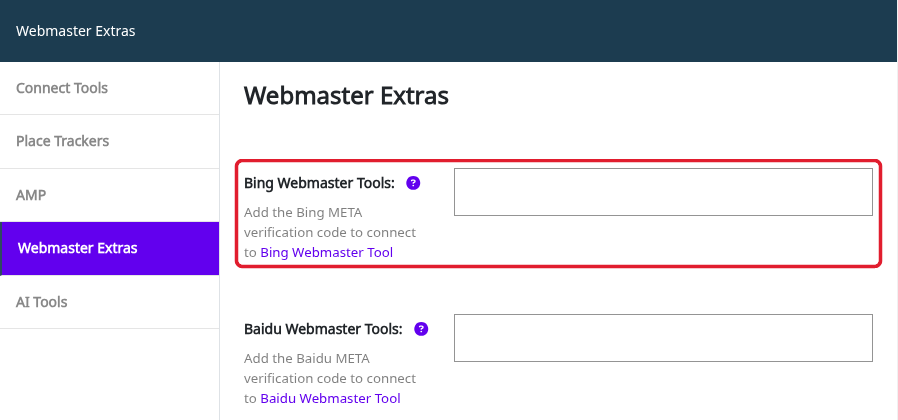
No Webmaster Extras tab? Go to Squirrly > All Features, find the Webmaster Tools card in Integration Features and click click to activate.
The Google Search Console sign-in on the Connect Tools tab is a separate step. It gives Squirrly your clicks and impressions, and it doesn’t replace the verification tag.
Related tutorials
- Webmaster Extras: Bing Webmaster Tools.
- Webmaster Extras: Google Search Console.
- Connect Tools: Google Analytics and Search Console sign-in.