Is there a Way to Remove the no-index Pages from the Sitemap using Squirrly?
Q: Is there a way to remove the no-index pages from the sitemap? I get the following recommendation: Pages with the no-index meta tag have been found in the XML sitemap. This is confusing for search engines since sitemaps should only list pages that have to be crawled and indexed.
A: Yes, you can use Squirrly SEO to remove the no-index pages from the sitemap.
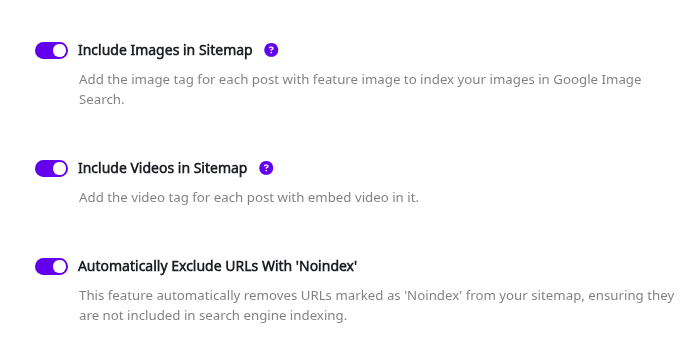
The easiest way is to go to Squirrly > Technical SEO > Tweaks & Sitemaps > Sitemap XML and turn on the option Automatically Exclude URLs With ‘Noindex’. Then click Save Settings.
The option shows in the SEO Expert view. It’s on by default when you set up the plugin in SEO Recommended Mode or SEO Expert Mode.
You can also do this by post type in Squirrly > Optimize > Automation > Configuration. Select the post type and switch off Include In Sitemap.

More details about this can be seen here.
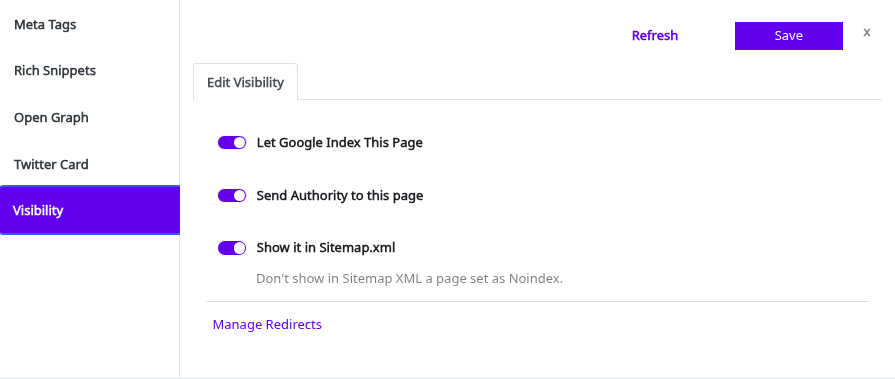
Or you can do it for one URL: edit its SEO Snippet, open the Visibility tab and switch off Show it in Sitemap.xml. More details about this can be seen here.
All the sitemap options are in Sitemap XML Settings.