How do I make sure all my settings are made properly and that I can get results in the first 14 Days?
Question/Issue:
“Greetings! I just signed up for your SEO software for my news blog. I will upgrade if results are achieved within these 14 days. Kindly let me know and take a look at my account if the setting is done correctly for optimization.”
Answer:
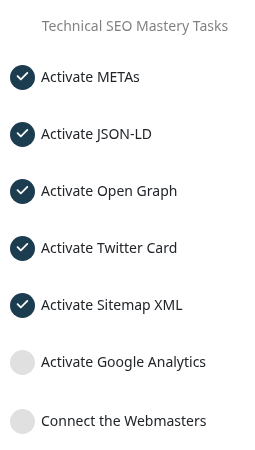
You’ll know if the settings are made properly by following the AI Consultant goals for each of the 14 days and by looking at the Mastery Tasks in the right column of the Squirrly screens. A task with a light gray circle is still open. Click it to see the steps that complete it.
Once you complete all the AI Consultant goals, it means you’ve successfully set everything up.
You can also complete all of the Mastery Tasks (the All Features page calls them the Settings Assistant). They sit in the right column of these screens:
- Squirrly > AI Research (Keyword Research Mastery Tasks)
- Squirrly > Optimize (Live Assistant Mastery Tasks)
- Squirrly > Technical SEO (Technical SEO Mastery Tasks)
- Squirrly > GEO Audit (Audit Mastery Tasks)
- Squirrly > Google Rankings (Rankings Mastery Tasks)
When every active task in a column is done, the column shows the badge Mastery Level Achieved. Clicking the badge opens this page.