SEO Links and Redirects
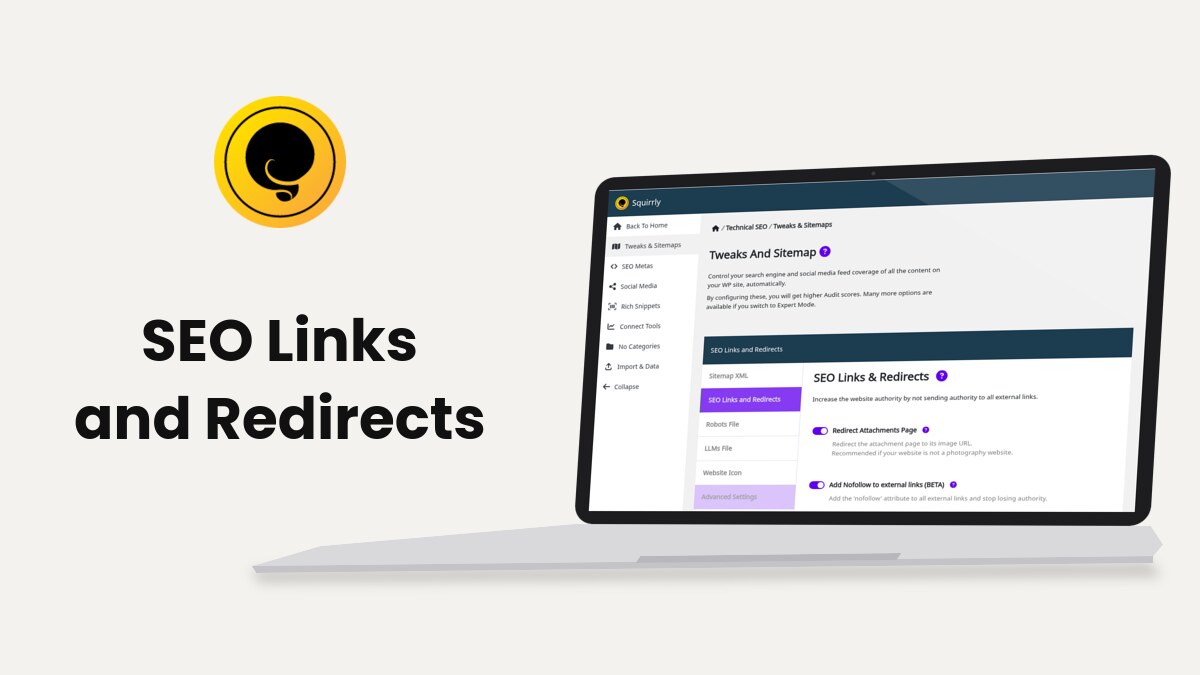
SEO Links, at Squirrly > Technical SEO > Tweaks & Sitemaps > SEO Links and Redirects, adds nofollow to the external links of your pages, can open them in a new tab and sends attachment pages to the file itself. It works on the HTML of the page as it loads, so you don’t edit any post.
The screenshots come from demo.squirrly.co, a test store for cat food, with Squirrly SEO 14.2.10 and the Advanced Pack 2.5.12.
What SEO Links changes
Squirrly reads every <a href> in the page before the page is sent to the visitor. A link is external when its host is not your site’s host, with “www.” ignored. Relative links, anchors, mailto: and tel: links stay as they are.
On a site at demo.squirrly.co, with Add Nofollow to external links and Open external links in New Tab both on, this link in a post:
<a href="https://www.example.com/cat-nutrition/">cat nutrition guide</a>reaches the browser as:
<a target="_blank" rel="nofollow" href="https://www.example.com/cat-nutrition/">cat nutrition guide</a>The post in the database doesn’t change. Switch the option off and the next page load shows the original link.
| Label | What it does | Default |
|---|---|---|
| SEO Links (All Features) | Master switch for the whole section | Off |
| Redirect Attachments Page | Sends a visitor of an attachment page to the image URL with a 301 redirect | Off (on after the onboarding’s SEO Recommended Mode or SEO Expert Mode) |
| Add Nofollow to external links | Adds rel="nofollow" to every external link | On |
| Open external links in New Tab | Adds target="_blank" to every external link | Off |
| Domain Exception | Domains whose links are left exactly as written | Empty |
The three switches only run while the SEO Links master switch is on. On a fresh install that means nothing changes until you activate it, even though Add Nofollow to external links is already on.
Where to find it
The SEO Links and Redirects tab shows in Squirrly > Technical SEO > Tweaks & Sitemaps only after you activate SEO Links. Its panel is called SEO Links & Redirects, with the line “Increase the website authority by not sending authority to all external links.”
Activate SEO Links
- Go to Squirrly > All Features.
- Scroll to Links Features and find the SEO Links card.
- Click click to activate at the bottom of the card.
- Go to Squirrly > Technical SEO > Tweaks & Sitemaps and open SEO Links and Redirects.
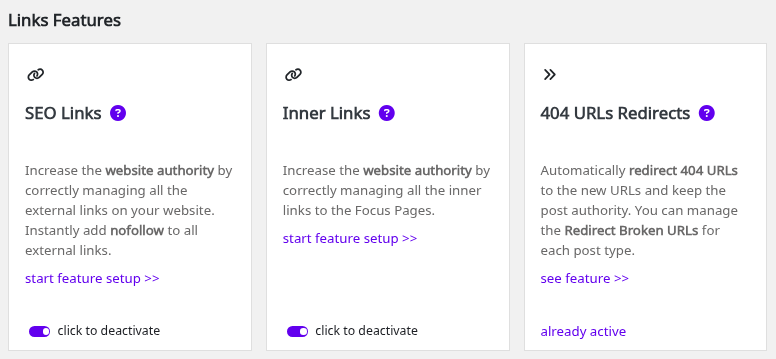
The card next to it, Inner Links, is a different feature: it adds links from your posts to your Focus Pages. 404 URLs Redirects is the third card in the same row.
Redirect Attachments Page
WordPress gives every file in the Media Library its own attachment page, an address that shows the file and little else. With Redirect Attachments Page on, Squirrly sends anyone who opens that page straight to the image URL with a 301 redirect.
- Open SEO Links and Redirects.
- Switch Redirect Attachments Page on.
- Click Save Settings.
The hint on the screen says “Recommended if your website is not a photography website.” On a photo site, where the attachment pages carry titles and text, leave it off. The same switch shows on the Attachment tab of SEO Automation, and it only redirects while SEO Links is on.
The attachment sitemap is a separate setting. It is off by default in Sitemap XML, with the note “Recommended if you have a photography website.” While attachment pages redirect, Squirrly leaves that sitemap out, even with the setting on.
Add Nofollow to external links
A nofollow link tells search engines not to pass your page’s authority to the site you link to.
- Switch Add Nofollow to external links on. The hint says “Add the ‘nofollow’ attribute to all external links and stop losing authority.”
- Click Save Settings.
A link with no rel gets rel="nofollow". A link that already has rel="noopener" becomes rel="nofollow noopener". A link that already says nofollow is left alone.
The option covers the whole page, menus, widgets and footer included. A subdomain counts as another site: on demo.squirrly.co, a link to shop.squirrly.co gets nofollow unless you add it to the exceptions.
See it on a page
Squirrly adds the attribute when the page loads, so the post in the editor stays as you wrote it. On the demo store, the senior cat food post links to the AAFCO website:

Domain Exception
Put the sites you want to keep as normal follow links in Domain Exception. The hint says “Add external links for who you don’t want to apply the nofollow.”
- Type one domain per line in the Domain Exception box, for example
wordpress.orgorhttps://www.youtube.com. - Click Save Settings.
Squirrly compares the host only, with “www.” removed, so youtube.com and https://www.youtube.com/ mean the same thing. Each subdomain needs its own line. Links to a domain on this list get neither nofollow nor the new-tab attribute.
Open external links in New Tab
- Switch Open external links in New Tab on. The hint says “Add the ‘_blank’ attribute to all external links to open them in a new tab.”
- Click Save Settings.
A link without a target gets target="_blank". A link with target="_self", _parent or _top is changed to _blank. This option is off by default.
Mark one link as sponsored or nofollow
The switches above work on every external link of the site. For one link, Squirrly adds its own options to the link box of the WordPress editor.
In the block editor
- Select the text and add the link, or click a link that’s already there.
- Open Link settings in the link popover.
- Switch on Sponsored, No Follow or Open in New Tab.
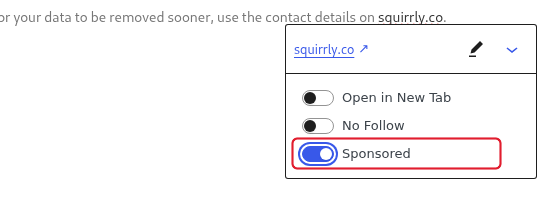
Sponsored adds rel="sponsored" to the link and No Follow adds rel="nofollow". Open in New Tab adds target="_blank" with rel="noreferrer noopener".
In the Classic editor
- Open the Insert/edit link window for the link.
- Tick Add rel=”sponsored”, Add rel=”nofollow” or both.
- Click Add Link, or Update for a link you’re changing.
The post saves the attribute in its content, so it stays when SEO Links is off.
Redirect broken URLs
Under the switches, the tab has a Redirect Broken URLs box with the button Manage redirects for each Post Type. It opens Squirrly > Optimize > Automation, where each post type has a Redirect Broken URLs switch. The tip on the tab says “Squirrly SEO will add a 301 redirect to the new slug without losing any SEO authority.” Redirect 404 links explains that switch.
A 301 for one page is in the Visibility tab of its SEO Snippet, see 301 redirect in Bulk SEO. Redirect rules for many URLs, with a 404 monitor and a log, are in the Redirects module, which needs the Squirrly SEO Advanced Pack.
Troubleshooting
The SEO Links and Redirects tab is missing
SEO Links is off. Activate it in Squirrly > All Features > Links Features.
External links don’t get nofollow
Open the page with ?sq_seo=off at the end of the URL and compare the source. If the link is the same both ways, check that the domain isn’t in Domain Exception, then clear the page cache of your cache plugin. The page must be one that Squirrly SEO loads on; see Check METAs with and without Squirrly SEO.
“Redirect is deactivated from Technical SEO > Tweaks And Sitemap > SEO Links.”
Bulk SEO shows this on the 301 Redirect task when the 301 redirects of the SEO Snippet are off. In SEO Expert mode, open the Visibility tab of any snippet and click Activate Redirects above the 301 Redirect field.
Attachment pages still open
Check that both SEO Links and Redirect Attachments Page are on. An attachment without a file URL stays where it is.
Frequently asked questions
Does SEO Links change my posts in the database?
No, it changes the links in the page HTML each time the page loads.
Are links to my own subdomains treated as external?
Yes, a different host gets nofollow unless you list it in Domain Exception.
Is Open external links in New Tab on by default?
No, you switch it on yourself after you activate SEO Links.
Can I keep follow links for one partner site?
Yes, add its domain on its own line in Domain Exception and save.
Can I add rel=”sponsored” to one link?
Yes, switch on Sponsored in the link settings of the block editor, or tick Add rel=”sponsored” in the Classic editor’s Insert/edit link window.
Related tutorials
- SEO Automation: Redirect Broken URLs and the attachment settings for each post type.
- Advanced Redirects Module: rules, 404 monitor and redirect log.
- Focus Pages Inner Links: links from your posts to the pages you want to rank.
- Sitemap XML Settings: which content goes in your sitemap.
- How does Squirrly Handle Broken Links?: what happens to old URLs.