
Using the Web Dev Kit on a Website where Squirrly SEO is Already Installed
Do you have the Web Dev Kit and want to install a custom version of Squirrly SEO on a site where the default plugin is already installed?
This guide is for you.
It lists every step you need to use the Web Dev Kit in this case, without losing the work you did with the default plugin.
Step 1: Back up Settings and SEO
Use Squirrly to:
- Back up all SEO Snippets, Settings and Briefcase Keywords on the website where the default Squirrly SEO plugin is installed.
Why this step matters:
With these backups you can restore all your Squirrly settings, snippet optimizations and Briefcase keywords after you delete the existing Squirrly SEO plugin and install the Web Dev Kit version.
How to back up Settings and SEO:
Go to Squirrly > Technical SEO > Import & Data > Backup Settings & SEO, and complete ALL of these steps:
- Backup Settings: click Download Backup to download all the settings from Squirrly SEO.
- Backup SEO: click Download Backup to download all the Squirrly SEO Snippet optimizations (an .sql file).
- Backup Briefcase: click Download Backup to download all Briefcase Keywords. (ONLY the keywords themselves are included in this backup.)
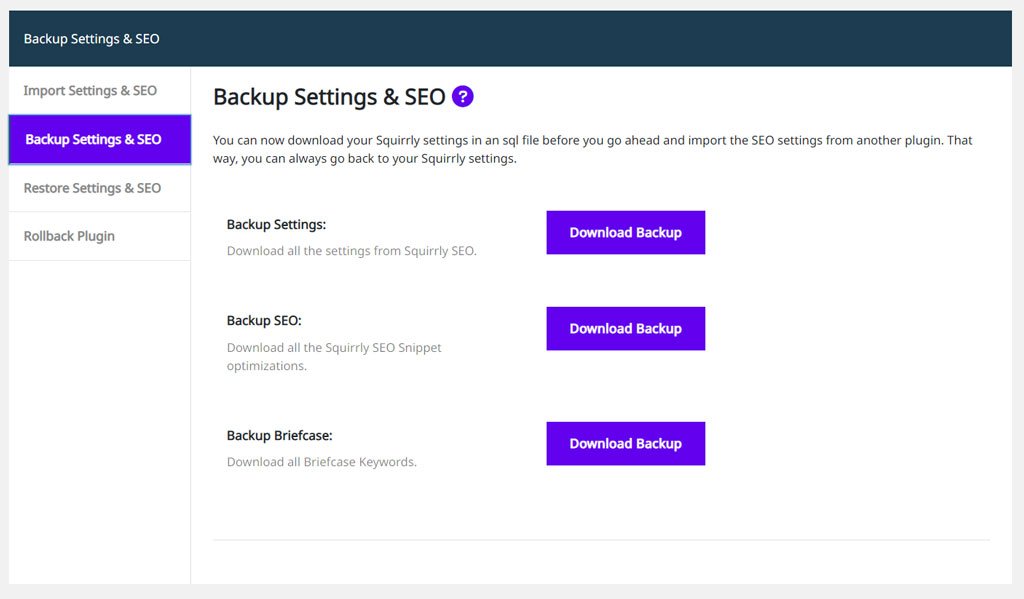
Keep these files. After you install the ZIP file with the Web Dev Kit customizations, you need them to restore the Briefcase keywords, the snippet optimizations and the settings you configured in Squirrly SEO.
Step 2: Turn on Delete Squirrly SEO Table on Uninstall
Go to Squirrly > Technical SEO > Tweaks & Sitemaps > Advanced Settings.
There you’ll find the option Delete Squirrly SEO Table on Uninstall.
Turn the switch on and click Save Settings.
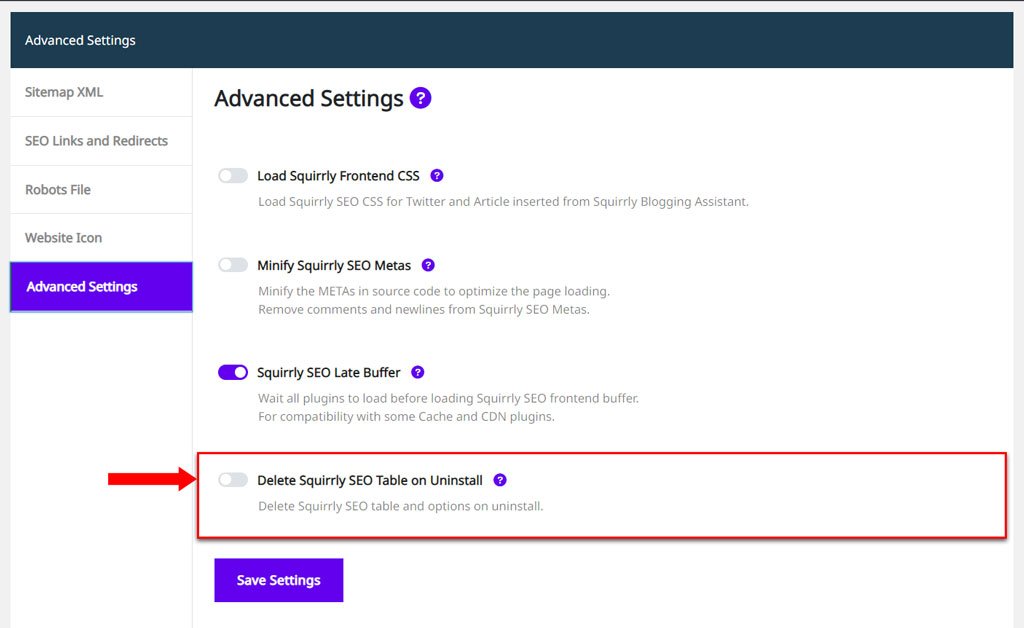
With this option on, the Squirrly SEO tables and options are deleted from the database when you delete Squirrly from a WordPress site.
That covers the Squirrly SEO options and the wp_qss, wp_qss_searches and wp_qss_searches_visitors tables.
After you turn Delete Squirrly SEO Table on Uninstall on, DEACTIVATE and DELETE the existing Squirrly SEO plugin from the site where you want to add the Web Dev Kit custom version.
Step 3: Download the ZIP file with your custom version of Squirrly SEO
Go to your Web Dev Kit Customization Panel.
After you save your configuration and the Squirrly SEO plugin is customized, you can download the ZIP file with the custom version you created with the Web Dev Kit.
Click the Download Squirrly SEO Plugin button and save the ZIP file to your computer.
IMPORTANT!
All customization options you can enable with the Web Dev Kit are explained here >>
If you don’t know yet how to customize Squirrly SEO with the Web Dev Kit, read that guide first.
Step 4: Install the Web Dev Kit ZIP file
To install the ZIP file with your custom Squirrly SEO plugin:
- Log in to your admin account on the WordPress site where you want to add the custom version of Squirrly.
- Go to Plugins > Add New.
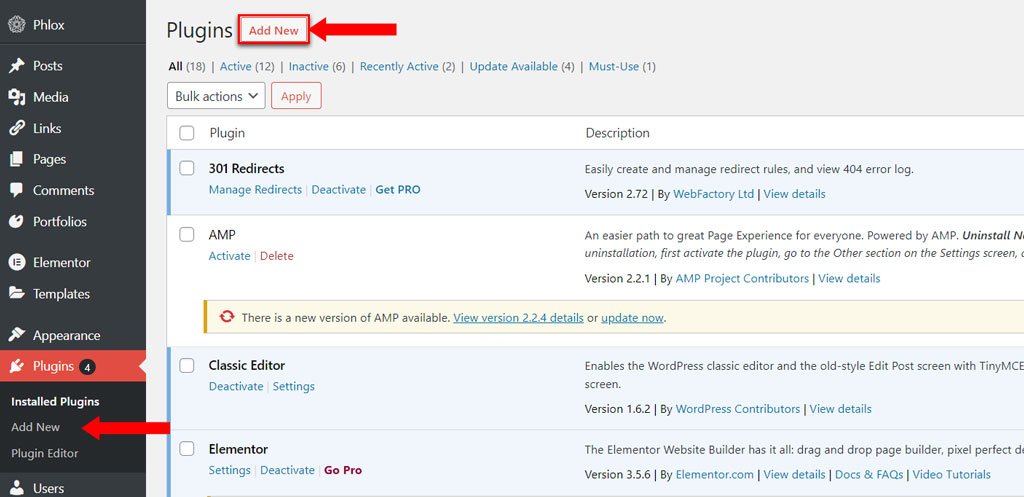
3. Click Upload Plugin. To add the ZIP file you downloaded from your Web Dev Kit Customization Panel, click the Choose File button.
Next, click Install Now.
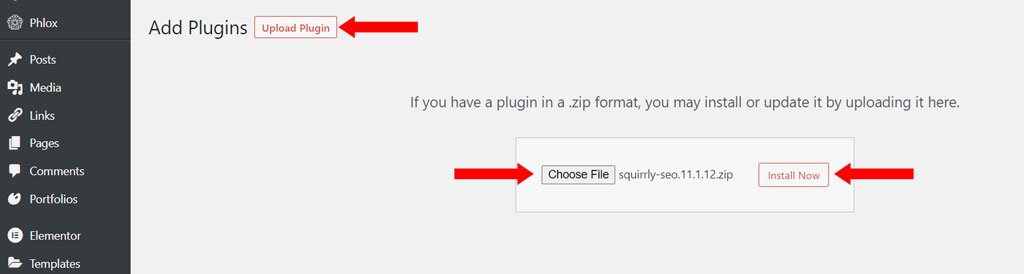
4. When the upload is complete, click Activate Plugin.
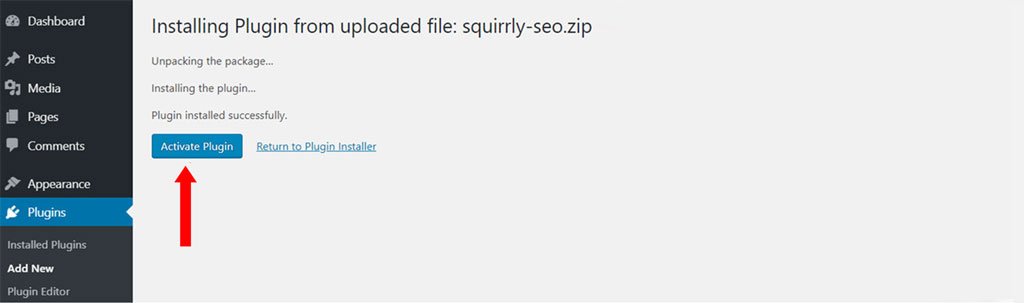
The plugin from the ZIP file has all the configurations you made in the Web Dev Kit Customization Panel.
Step 5: Restore the SEO and settings you backed up in Step 1
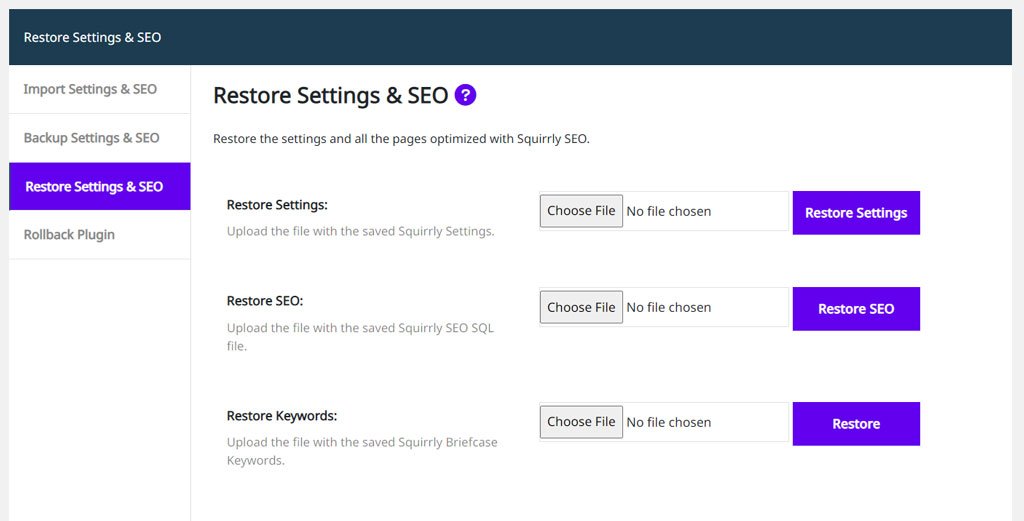
Go to Squirrly > Technical SEO > Import & Data > Restore Settings & SEO, and complete ALL of these steps:
- To restore settings: under Restore Settings, upload the file with the saved Squirrly Settings and click Restore Settings.
- To restore SEO Snippets: under Restore SEO, upload the SQL file with the saved Squirrly SEO snippet optimizations and click Restore SEO.
- To restore Briefcase Keywords: under Restore Keywords, upload the file with the saved Briefcase Keywords and click Restore Keywords.
Restore Settings keeps the Web Dev Kit settings of the new install. Your Dev Kit logo, plugin name, menu name, the Dev Kit audit messages and the Squirrly menu switches stay as the custom version set them, and the Cloud connection of the new install isn’t replaced by the one in the backup.
That’s it!
With these steps you replace the default Squirrly SEO plugin with your Web Dev Kit custom version and keep the SEO snippet optimizations, settings and Briefcase keywords from the previous install.




