Advanced Settings

Advanced Settings is a tab in Squirrly > Technical SEO > Tweaks & Sitemaps with eight switches that decide where Squirrly SEO loads and how it prints its code. It shows only in SEO Expert mode, and every switch already has a default from the install.
The screenshots come from demo.squirrly.co, a test store for cat food, with Squirrly SEO 14.2.8 and the Advanced Pack 2.5.11. The demo runs in SEO Beginner mode, which is why the tab isn’t visible in the screenshot below.
What Advanced Settings does
The switches apply to the whole site. For settings per post type, use Automation, and for one page, the SEO Snippet.
Where to find it
- Open any Squirrly screen and click SEO Expert in the top bar, next to SEO Beginner.
- Go to Squirrly > Technical SEO > Tweaks & Sitemaps.
- Click the Advanced Settings tab in the list on the left, under Sitemap XML, Robots File and the other tabs.
- Change the switches you need and click Save Settings.
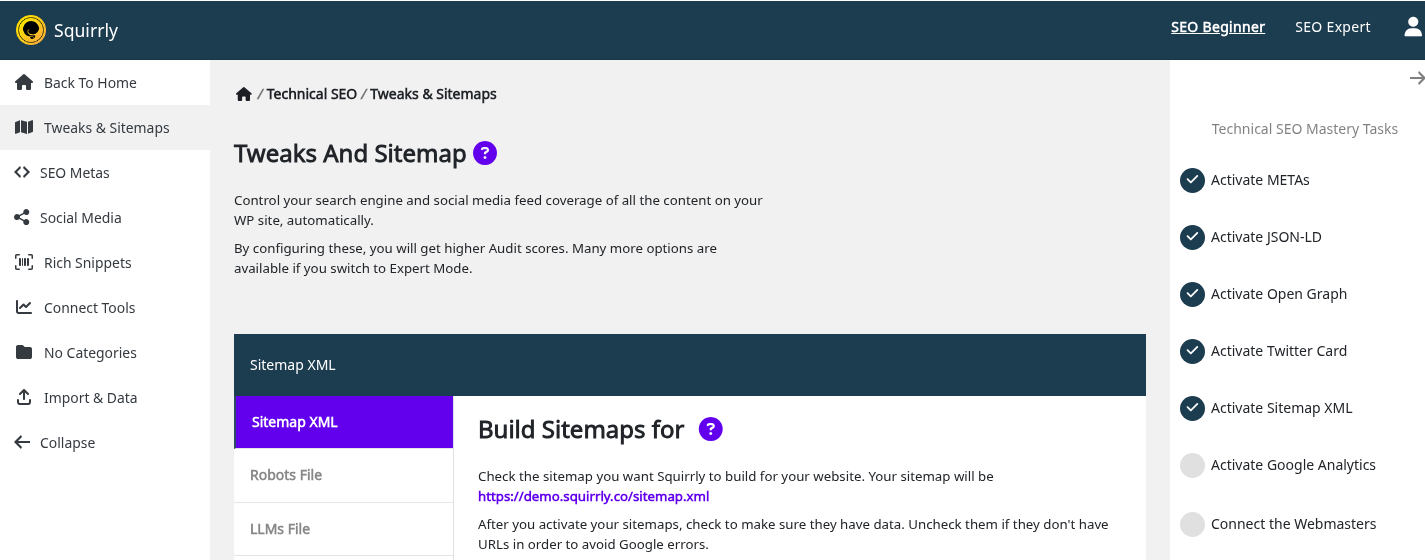
SEO Expert mode also shows the other options marked as advanced on Squirrly screens, like META Lengths in Automation. You can switch back to SEO Beginner at any time, and the values you saved stay the same.
The options
| Label | What it does | Default |
|---|---|---|
| Load SEO Snippet in Frontend | Opens the SEO Snippet from the page preview, so you edit the SEO while you look at the page | Off (the SEO Recommended Mode and SEO Expert Mode setup turn it on) |
| Load Squirrly Admin Bar in Backend | Adds the Squirrly menu to the WordPress admin bar in the backend | On |
| Load Squirrly Widget in Admin Dashboard | Adds the Squirrly SEO widget with the SEO goals to the WordPress Dashboard | On |
| Load Squirrly Frontend CSS | Loads frontend.min.css for the boxes inserted with the Blogging Assistant | Off |
| Minify Squirrly SEO Metas | Prints the Squirrly metas on one line, without comments | Off |
| Load Squirrly SEO Late Buffer | Waits for all plugins to load before Squirrly writes its metas | Off |
| Multilingual Support | Converts other encodings to UTF8 to avoid ajax errors | On |
| Delete Squirrly SEO Table on Uninstall | Deletes the Squirrly table and options when you delete the plugin | Off |
Load SEO Snippet in Frontend
With the switch on, a Custom SEO item shows in the admin bar when you view a post or a term on the live site, for users who can edit it, and it opens the SEO Snippet on that page. It is the same setting as Activate SEO Snippet in Frontend in SEO Metas, so changing one changes the other. The demo has it on.
Load Squirrly Admin Bar in Backend
This puts the Squirrly item, with the Squirrly logo, in the dark admin bar at the top of every admin screen. When Squirrly finds errors, the item shows their number. Turn it off if you don’t want the item there; the left menu stays.
Load Squirrly Widget in Admin Dashboard
The widget is called Squirrly SEO and shows on the main WordPress Dashboard, with a quick view of your daily SEO goals. It loads only when the plugin is connected to Squirrly Cloud. The goals themselves are explained in Next SEO Goals.
Load Squirrly Frontend CSS
The Blogging Assistant inserts tweets, Wikipedia quotes and blog articles into a post as boxes. The file frontend.min.css styles those boxes on the live site. When the switch is on, Squirrly adds this line to every page:
<link rel='stylesheet' id='aca33b9c04-css' href='https://example.com/wp-content/plugins/squirrly-seo/view/assets/css/frontend.min.css' media='all' />The switch is off by default, and the demo has it off. Turn it on only if your posts have boxes inserted from the Blogging Assistant. The CSS never loads on ajax requests or in a page builder preview. Remove the Squirrly frontend.css from the source code shows the wp-config.php line that blocks it for good.
Minify Squirrly SEO Metas
Squirrly prints its metas in the head of the page, one per line, between two comments:
<!-- SEO by Squirrly SEO 14.2.8 - https://plugin.squirrly.co/ -->
...
<!-- /SEO by Squirrly SEO - WordPress SEO Plugin -->
With Minify Squirrly SEO Metas on, the newlines and the two comments are removed. The metas stay the same. Minify doesn’t run while the plugin is in debug mode.
Load Squirrly SEO Late Buffer
By default, Squirrly writes its block at the top of the head, right after the charset meta. The demo page source shows that order: <meta charset="UTF-8"> on line 8, then the Squirrly title on line 9.
With the Late Buffer on, Squirrly waits for all plugins to load and writes its block just before </head>. The screen says this is “For compatibility with some Cache and CDN plugins.” Turn it on when a cache or CDN plugin drops the Squirrly metas, then purge the cache and check the page source again.
Multilingual Support
The switch shows only when the site language isn’t English. When it is on, Squirrly removes invalid characters from the HTML of its own screens and from its ajax replies, so one broken character in a title doesn’t break the screen. The demo site is in en-US, so the switch is hidden there. Does Squirrly SEO support Multilanguage Plugins like WPML? covers the translation plugins.
Delete Squirrly SEO Table on Uninstall
With the switch off, deleting the plugin keeps your Squirrly data, so you can install it again later and find everything as it was. With the switch on, deleting Squirrly SEO from Plugins also deletes from the database:
- the options sq_options, sq_ml_patterns and sq_tasks (all the settings, patterns and tasks)
- the table wp_qss, which holds the SEO Snippet of every page
- the tables wp_qss_searches and wp_qss_searches_visitors, used for the WooCommerce search pages
The table names use your database prefix, wp_ on a default install. Back up first: Squirrly > Technical SEO > Import & Data has Backup Settings & SEO. Deactivating the plugin deletes nothing; only the Delete link in Plugins does. The switch works on this WordPress database only.
Troubleshooting
I can’t see the Advanced Settings tab
The tab shows only in SEO Expert mode. Click SEO Expert in the Squirrly top bar and open Tweaks & Sitemaps again.
The Multilingual Support switch is missing
Your site language is English, and the switch shows only for other languages.
The Squirrly widget isn’t on my Dashboard
The widget loads only when the plugin is connected to Squirrly Cloud and Load Squirrly Widget in Admin Dashboard is on. Also check Screen Options at the top of the Dashboard, where WordPress lets you hide widgets.
frontend.min.css still loads after I turned the switch off
The cached pages still have the old head. Purge your cache plugin and the CDN, then view the page source again.
The Squirrly metas are missing from the page source
Turn on Load Squirrly SEO Late Buffer, save, purge the cache, and reload the page source. Check METAs with and without Squirrly SEO shows how to compare them.
Frequently asked questions
Do I need to change Advanced Settings after I install Squirrly SEO?
No, every switch has a default from the install, and the tab stays hidden in SEO Beginner mode.
What does Minify Squirrly SEO Metas change in the page source?
It removes the newlines and the two Squirrly comments from the meta block, and the metas themselves stay the same.
Will switching to SEO Beginner reset these options?
No, the tab is only hidden and the saved values keep working.
What gets deleted when I uninstall Squirrly SEO?
Nothing, unless Delete Squirrly SEO Table on Uninstall was on when you deleted the plugin.
Related tutorials
- Sitemap XML Settings: the first tab of Tweaks & Sitemaps.
- SEO Metas: the metas that Minify and the Late Buffer print.
- Import and Data: back up the settings and the SEO before you delete the plugin.
- Remove the Squirrly frontend.css from the source code: block the CSS file from wp-config.php.
- What Database Tables Does Squirrly SEO Create?: the tables behind the uninstall switch.